
Construction document control is the disciplined process of logging, versioning, approving and distributing every project record so that everyone works from the same current information. Three actions cut risk immediately: establish one single source of truth for all documents, enforce a mandatory naming and revision standard, and assign a named document controller with clear authority to publish approved versions.
Get these three right and you address the single biggest drain on site productivity. Industry reporting from Autodesk finds construction professionals spend roughly 35% of their working time hunting for project information rather than acting on it.
- Set a single source of truth. Every drawing, RFI, and submittal lives in one system, not scattered across inboxes.
- Enforce a naming standard. Every file follows the same revision and status convention from day one.
- Assign a document controller. One named person owns publication and approval authority.
Key Takeaways
Construction document control works because it replaces scattered files with one governed source of truth, clear ownership, and enforced approval timelines.
| Point | Details |
|---|---|
| Start with a single source of truth | Consolidate drawings, RFIs, and submittals into one system before adding any other process. |
| Track the 35% metric | Time spent searching for information is the fastest way to prove or disprove your rollout's value. |
| Assign clear ownership | A named document controller with publishing authority prevents version confusion and accountability gaps. |
| Set service-level windows | Agree RFI and submittal turnaround times in advance rather than leaving them to goodwill. |
| Use House A-Z for small projects | Its centralised platform and AI agents suit renovators and small contractor teams without a dedicated document controller. |
Table of Contents
- What does construction document control actually cover?
- Why does poor document control cause so many project failures?
- Which documents must every system track?
- Who owns which part of the document control process?
- What workflow should submissions and approvals follow?
- What features actually reduce risk in a document control tool?
- How do you roll out document control in the first 90 days?
- What mistakes derail document control most often?
- What productivity gains can you expect from tighter document control?
- What compliance and regulatory rules apply to construction records?
- How do you keep construction documents secure and confidential?
- How do you get teams to actually adopt new document control habits?
- How House A-Z fits into your document control plan
- Sources
- FAQ
What does construction document control actually cover?
Construction document control is narrower than general document management. It governs the controlled records that determine what gets built, when, and to what standard, not every file a project generates. General document management might include marketing collateral or internal meeting notes; document control is reserved for anything that carries contractual or compliance weight.
On a typical project, that scope includes drawings and issued-for-construction (IFC) sets, requests for information (RFIs), submittals and shop drawings, change orders and variations, specifications and contracts, and permits and inspection records.
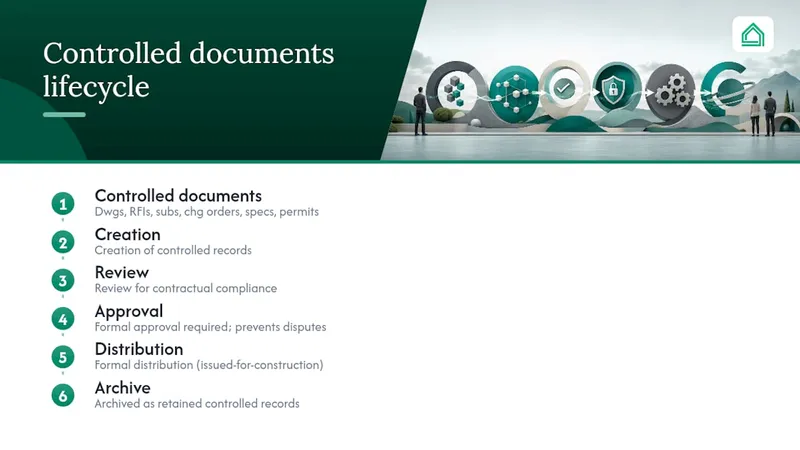
Document control also has a defined lifecycle: creation, review, approval, distribution, and archive. A record that skips any of these stages, say, a revised drawing distributed without formal approval, is exactly where disputes and rework originate.
Why does poor document control cause so many project failures?
Strong document control delivers fewer errors, faster decisions, and a defensible paper trail if a dispute reaches arbitration. Weak control does the opposite, and the cost is measurable.
The 35% problem: Construction professionals lose roughly a third of their working week searching for information that should already be at their fingertips. On a 40-hour week, that is 14 hours spent looking instead of building.
The knock-on risks are predictable:
- Rework from building off superseded drawings
- Schedule slippage while teams wait on lost or unreviewed submittals
- Cost overruns tied to change orders that were never formally logged
- Weak evidentiary position in disputes when correspondence cannot be reconstructed
The Bureau of Engineering's project delivery manual is blunt about this: delays in processing documents delay project completion and increase costs directly.
Which documents must every system track?
A document control system is only as useful as the records it captures and the metadata attached to each one. Miss a field, and the record becomes unreliable exactly when you need to rely on it most.
- Site drawings and IFC sets — the baseline everyone should be building from.
- RFIs — the paper trail behind every clarification and its resolution.
- Submittals and shop drawings — proof that materials and methods met specification before installation.
- Change orders — the contractual record of scope, cost, and time adjustments.
- Contracts and specifications — the governing terms against which everything else is measured.
- Inspection records and permits — your compliance evidence.
- Daily reports and site photos — the contemporaneous record disputes are won or lost on.
Every record needs, at minimum, a document number, revision level, date, named author or owner, and current status. Without those five fields, a "controlled" document is just a file with a good intention behind it.
Who owns which part of the document control process?
Version confusion nearly always traces back to unclear ownership, not bad software. Assign these roles explicitly before the project starts:
- Document controller — administers the system, enforces naming conventions, and logs every transaction.
- Project manager — approves publication of controlled documents and resolves escalations.
- Design team — issues drawings and specification updates through the controller, never directly to site.
- Subcontractors — submit RFIs and submittals through the defined workflow, not by email or phone call.
- Closeout coordinator — collects as-built records and warranty documentation at project end.
The project manager (or a delegated lead) should hold sole authority to approve and publish master record revisions. Everyone else works from read access or a submission queue. Build a simple permissions matrix with an escalation path (controller flags a delay, PM resolves within a fixed window) so nobody is guessing who can override a stalled approval.
What workflow should submissions and approvals follow?
Every controlled document moves through the same five stages: submission, review, approval, distribution, and version control. The process only works if response times are agreed in advance, not left to goodwill.
- Submission — contributor uploads the document with full metadata against the naming standard.
- Review — the assigned reviewer checks technical content and compliance, logging comments against the record.
- Approval — the authorised approver signs off or rejects with reasons recorded.
- Distribution — the approved version is pushed automatically to everyone on the distribution list.
- Version control — the superseded version is archived, never deleted, and clearly marked as historical.
Recommended service-level windows to write into your project procedures:
- RFI response: 5 to 7 working days
- Submittal review turnaround: 10 to 14 working days depending on complexity
- Revision publication: within 24 hours of approval
Every action, submission, comment, approval, rejection, needs a timestamp and a named actor logged automatically. That audit trail is what protects you if a dispute later turns on who knew what, and when.
What features actually reduce risk in a document control tool?
A common data environment (CDE) is only worth adopting if its features genuinely change behaviour on site. Look for:
- Single source of truth — one platform, not five apps stitched together.
- Automatic versioning — supersede logic that prevents anyone opening an old revision by accident.
- Metadata and naming enforcement — the system rejects files that don't follow convention.
- Role-based access — subcontractors see only what's relevant to their scope.
- Mobile and offline access — site teams can log and view records without signal.
- Integrations — links to BIM models and the master schedule, so a drawing change flags downstream tasks.
- Automated notifications — the right person is alerted the moment a status changes.
- Audit trail and search — every action is timestamped and instantly retrievable.
On small-to-medium projects, mobile access and automated notifications tend to deliver the fastest return. A single source of truth paired with automated alerts is one of the quickest ways to cut the hours lost searching for information.
Pro Tip: When trialling a system, test search speed under load, how it behaves offline on a site with no signal, and whether the audit log reads clearly enough to hand to a solicitor without explanation.
How do you roll out document control in the first 90 days?
Treat the rollout as a phased pilot, not a big-bang switch. This sequence keeps risk low while proving value early.
- Days 0 to 30: Governance. Appoint the document controller, agree the naming convention, and select the platform.
- Days 0 to 30: Pilot selection. Choose one active project as the pilot, ideally one with heavy RFI or submittal volume.
- Days 31 to 60: Training. Run role-specific sessions, controller trains PMs, PMs brief subcontractors on submission requirements.
- Days 31 to 60: Templates. Publish standard templates for RFIs, submittals, and change orders across the pilot project.
- Days 61 to 90: Integration. Connect the system to scheduling and, where relevant, the BIM model.
- Days 61 to 90: Review and scale. Measure pilot success against RFI turnaround and rework hours, then extend to further projects.
Evaluate the pilot on hard numbers, not sentiment: did RFI response times fall, and did rework hours drop against the previous project baseline.
What mistakes derail document control most often?
Most failures repeat across projects because the fixes are simple but get skipped under time pressure.
- Paper reliance → digitise intake immediately; a photographed form is still a form nobody can search.
- Spreadsheet-only control → spreadsheets commonly break down once a business runs more than around ten active projects or faces heavy RFI and change-order volume.
- Inconsistent naming → enforce one convention before a single file is uploaded, not after the chaos starts.
- No mobile access → site staff default to email if they can't log records from the field.
- Missing closeout planning → tie a portion of final payment to timely submission of as-built records, and completeness improves markedly.
What productivity gains can you expect from tighter document control?
The 35% figure on time lost to searching isn't abstract. On a project with a five-person site team, that's roughly two full working days a week spent looking rather than building or reviewing.
Tightening document control converts a meaningful share of that lost time into productive hours, though the exact recovery depends on how disorganised the baseline was.
Track these KPIs from week one so you can prove the gain rather than assume it:
- Average time spent searching for documents
- RFI turnaround time (submission to resolution)
- Rework hours and cost tied to outdated drawings
- Submittal review cycle time
What compliance and regulatory rules apply to construction records?
Document control isn't only an efficiency exercise, it's frequently a contractual and regulatory obligation. Building control regimes typically require permits, inspection sign-offs, and as-built records to be retained and produced on request, and the retention period often outlasts the construction phase itself by years.

Contracts routinely specify document-control obligations directly: who must issue drawings, what constitutes formal notice of a variation, and how RFIs must be logged to be contractually valid. Miss these contractual formalities and a legitimate claim can be weakened purely on process grounds, regardless of its technical merit.
Professional bodies such as RICS publish guidance that many project teams use to shape internal document-control policy and demonstrate they are following recognised practice standards. That matters most when a dispute reaches adjudication: a team that can point to a documented, standards-aligned process is in a materially stronger position than one relying on ad hoc habits.
Specific regulatory requirements vary considerably by jurisdiction, project type, and contract value, so treat any general guidance as a starting point rather than a substitute for checking the rules that apply to your specific project and location. What holds universally is the principle: if a record is required for compliance, it needs the same rigour, numbering, revision control, and approval trail, as any technical drawing.
How do you keep construction documents secure and confidential?
Construction records routinely contain commercially sensitive pricing, personal data on staff and subcontractors, and security-relevant information about a building's layout and systems. Treating security as an afterthought is one of the more expensive mistakes a project can make.
Role-based access is the foundation: a subcontractor should see the drawings and specifications relevant to their scope, not the full contract value or a competitor's pricing on the same job. Layer that with encryption for data at rest and in transit, and a clear policy on who can export or print controlled documents outside the system.
Where documents contain personal data, staff records, subcontractor details, site access logs, teams handling that information should follow applicable data protection guidance on lawful storage, retention, and access. This is particularly relevant when platforms are cloud-hosted and data may be processed across borders.
A practical baseline covers four points: role-based permissions enforced by default rather than by request, an audit log of every access and download, a defined retention and deletion schedule, and a written policy on external sharing (many disputes originate from a drawing forwarded outside the approved distribution list). None of this requires exotic technology. It requires the access model being decided deliberately rather than left to whoever set up the shared folder first.

How do you get teams to actually adopt new document control habits?
The best document control system in the world fails if site teams route around it because the old way felt faster. Adoption, not software selection, is usually where rollouts stall.
Start training with the people who feel the pain most directly, subcontractors submitting RFIs and site supervisors logging daily reports, rather than beginning with management reporting features nobody on site cares about. Show them the immediate personal benefit: fewer chased emails, faster answers, a record that protects them if a dispute arises over what was actually agreed.
Change management works best in small, visible wins. Publish the naming convention and templates before asking anyone to use them, run a short hands-on session rather than a slide deck, and nominate a champion on each project who can answer questions without escalating to the document controller every time. Momentum builds fastest when the first pilot project produces a result people can see, a submittal approved in days instead of weeks, an RFI resolved without a site visit.
Resistance usually traces to one of two causes: the process feels slower than the old habit, or nobody explained why it matters. Fix the first by simplifying the submission form to the bare minimum fields. Fix the second by sharing turnaround-time improvements with the whole team, not just management. Reinforce the habit for the first few weeks with light-touch reminders rather than enforcement, since punitive rollouts tend to breed workarounds rather than compliance. Setting expectations clearly at kickoff, including with contractors, removes most of the friction before it starts.
What does success actually look like on site?
Quick wins come from the boring parts, naming conventions and a single approval owner, not from the software's feature list. The harder part is always culture: teams that resist logging an RFI properly will find a workaround around even the best system.
Sources
- Process productivity in construction | Autodesk
- 16.5 Construction Document Control | Bureau of Engineering
- Construction document control: A practical guide | Fieldwire by Hilti
- Document Controller Job Description (Duties & Salary)
FAQ
What is document control in construction?
It is the process of logging, reviewing, approving, and distributing project records, drawings, RFIs, submittals, and contracts, so every team member works from the current, approved version.
What does a construction document controller earn?
Salary varies by region, project size, and experience, and no single figure applies universally; check current job listings and industry role descriptions for your local market.
How do you become a construction document controller?
Most enter through administrative or site-based roles, building experience with drawing registers and submittal tracking before specialising, often supported by recognised industry training routes.
What does a construction document controller actually do day to day?
They maintain the master record, enforce naming and revision standards, log every submission and approval, and ensure the right people receive the current version at the right time.
When should a project move from spreadsheets to a dedicated system?
Spreadsheets typically become unreliable once a team manages more than about ten active projects or faces heavy RFI and change-order volume; a platform like House A-Z suits smaller renovation teams before that threshold too.
Recommended
- Set Expectations with Contractors: Communication Tips | House A-Z Blog