Coordinating budgets, schedules and contractor communications in home renovation projects often leads to costly errors and missed approvals when managed across scattered apps or paper records. Many project management tools either restrict core features like AI-guided planning to expensive enterprise plans or lack live budget tracking and voice-driven task entry for teams managing site and office handoffs. This comparison covers team features, pricing tiers and workflow automation in three home renovation project management suites so you can choose software that matches your renovation needs without sacrificing oversight or ease of use.
Table of Contents
buildNest
At a Glance
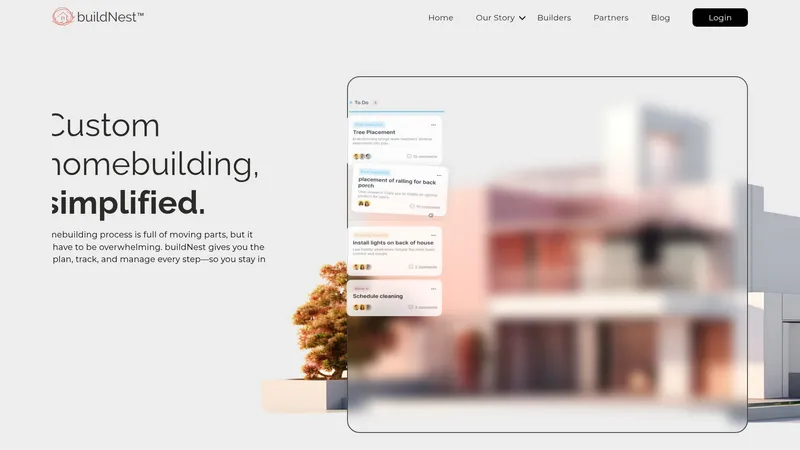
buildNest centres its service offering in Kansas City while combining project planning, budget tracking and contractor collaboration into a single dashboard. The platform emphasises transparency and real-time cost control so homeowners and builders can follow decisions and payments in one place.
Core Features
- Real-time budget management that updates costs as invoices and change orders arrive, keeping contingency visible.
- Task management that lists every step, due date and owner so work does not slip between trades.
- Contractor & vendor management tools for document sharing, approvals and role-based access.
- Document storage and a single source for approvals to speed sign-offs and disbursements.
These features hang off a single project workspace intended to replace scattered spreadsheets and email threads.
Key Differentiator
buildNest's selling point is its all-in-one focus on the nuts and bolts of custom homebuilding, pairing scheduling with live cost tracking. Compared with House A-Z, which advertises AI agents and broader platform ambitions, buildNest serves a narrower market and focuses on practical contractor collaboration and budget control for local projects.
Pros
- Centralised project view removes the need to juggle multiple spreadsheets and message chains. That makes oversight easier when you are managing several subcontractors.
- The emphasis on transparent cost tracking helps prevent small scope changes from becoming budget surprises. Owners see running totals rather than end-of-month shocks.
- Built-in approval flows reduce payment delays by keeping sign-offs and supporting documents in one place. Faster disbursements keep contractors working.
- The platform speaks the language of builders: tasks, draws, vendors and approvals are first class objects rather than ad hoc workarounds.
- Onboarding for a single project is practical; homeowners report that shared project access improves contractor accountability and reduces back-and-forth.
Cons
- No third-party reviews are available, so independent user experience and long term reliability are unknown.
- The product data lists no integrations, which suggests limited connections to accounting packages, mortgage platforms or supplier portals.
- The service is described with a regional focus on Kansas City which may limit relevance if you need multi-state roll out or national vendor networks.
When It May Not Fit
If you need a platform with extensive integrations to accounting software or a national roll-out plan, buildNest may feel constricted. Also, if you rely on independent user ratings when selecting tools, the absence of third-party reviews will be a drawback.
Who It's For
Homeowners building a bespoke house, local builders coordinating multiple trades, and partners who deliver homebuilding services to clients in and around Kansas City. Best where tight budget control and contractor coordination matter more than a vast app ecosystem.
Real World Use Case
A homeowner uses buildNest to map the full build schedule, attach contracts and log change orders. Contractors upload invoices and the owner signs approvals in-app. The project manager tracks payments and sees the updated budget in real time so cashflow conversations stay factual.
Website: https://buildnest.ai
Formus
At a Glance
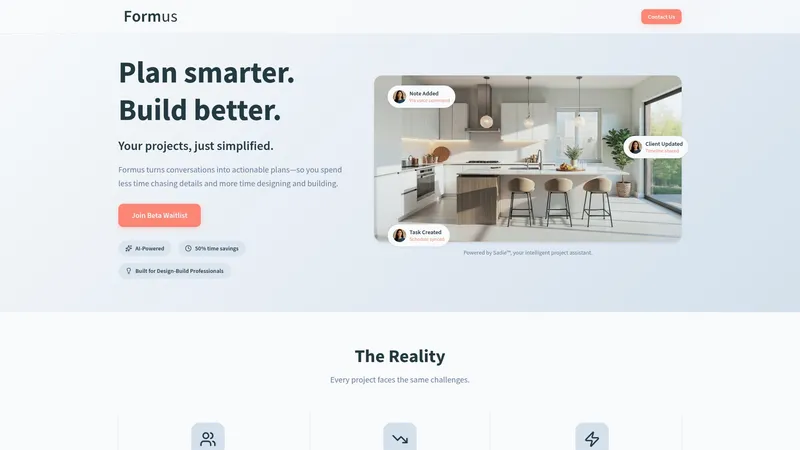
The vendor advertises an early access beta that joins teams via a waitlist and does not require a credit card for onboarding, which lowers the barrier to trial. Formus converts spoken conversations into taskable plans for design build teams and claims measurable time savings through that approach.
Core Features
Formus centralises project records, schedule items, and stakeholder messages into a single project space so fewer emails and spreadsheets are needed. It supports voice commands for notes and scheduling, offers shared project portals for client updates, and suggests improvements with AI driven workflow learning.
Key Differentiator
Voice first interaction sets Formus apart. The product focuses on letting site meetings and client calls become immediate project items without manual transcription. Its workflow learning adapts to construction and design patterns rather than general office projects, which narrows the tool to a specialist audience.
Pros
- Reduces admin overhead by converting conversations directly into tasks and calendar items, which helps teams spend more time on site and less time on data entry.
- Real time project portals keep contractors, clients and subcontractors aligned without sending repeated status emails.
- The voice led workflow lets an architect or site foreperson capture decisions hands free while work proceeds, a practical improvement over pen and paper notes.
- Consolidates inputs from drawings, schedules and messages into one view so fewer systems need syncing or manual reconciliation.
Cons
- It is an early stage beta so some features may be missing and occasional instability is possible while the product matures.
- Initial dashboard customisation and administrator controls appear limited compared with established project management suites.
- A few early users report responsiveness issues and rigid dashboards which can slow adoption for teams wanting a lot of configuration.
When It May Not Fit
If your organisation requires deep customisation of workflows or advanced admin controls today, Formus during early access will feel constraining. Teams that depend on mature integrations or enterprise grade stability should wait for later releases rather than adopt the beta for mission critical projects.
Who It's For
Construction, architecture and design professionals who prefer capturing decisions in conversation and want fewer handoffs between site, office and clients. Good for small to mid sized design build teams wanting to reduce admin time without adding another manual workflow.
Real World Use Case
An architect conducts a site walk with a client and speaks finish decisions into Formus. Tasks and a revised timeline appear in the project portal the same day, subcontractors receive updates, and follow up emails drop noticeably. That practical shift illustrates the vendor’s time saving claim.
Pricing
Currently offered via waitlist for early access and the vendor lists beta onboarding as not requiring a credit card. No public pricing tiers are available while Formus remains in early access.
Website: https://formus.ai
Home Renovation Project Management Software Comparison
Choosing the best platform for managing your home renovation depends largely on the integration of design, budgeting, and collaboration tools tailored to your needs.
| Product | Core Feature | Key Differentiator | Best For | Pricing | Notable Limitation |
|---|---|---|---|---|---|
| House A-Z | AI-powered layout and budget suggestions | Personalized AI-driven design and budgeting | Renovators desiring seamless integration | Free, €29/month Pro, €99/month Enterprise | Advanced plans may be costly for solo homeowners |
| buildNest | Real-time budget and contractor management | Transparent cost tracking tailored to trade tasks | Local Kansas City builders | Not disclosed | Regional focus may not suit multi-state projects |
| Formus | Voice command-enabled task and timeline creation | Voice-first workflow capturing site decisions | Design teams seeking hands-free updates | Not disclosed | Early beta may lack features and exhibit occasional instability |
Frequently Asked Questions
What features make House A-Z suitable for first-time renovators?
House A-Z offers AI-powered layout and budget suggestions tailored to your specific preferences and timeline. These features help users avoid costly mistakes by providing a shared space for planning and collaboration. Consider using House A-Z to streamline your renovation project from start to finish.
How does buildNest compare with House A-Z in terms of budget management?
buildNest excels in real-time budget management, allowing homeowners to track costs as invoices and change orders are added. In contrast, House A-Z integrates layout design with budget suggestions, focusing on providing a comprehensive planning experience. Choose House A-Z if you value a combined approach that includes both design and budget oversight.
Which platform offers better project oversight for multiple contractors?
House A-Z facilitates support for multiple projects and properties, making it an ideal choice for renovators and small contractors managing several clients. The built-in collaboration features enable better communication, while project tracking tools simplify oversight. If managing varying projects is important, House A-Z may be the better fit.
Are there any subscription options available with House A-Z for occasional users?
House A-Z offers flexible subscription options, including a free tier and a Pro plan at €29/month, allowing users to access core features before deciding on an enterprise plan at €99/month. This flexibility is useful for occasional users who want to try the platform without high upfront commitments. Opting for the free tier might be a good starting point if you’re unsure about long-term commitment.
How does the mobile app enhance usability for House A-Z users?
The House A-Z mobile app allows users to keep track of decisions and receipts on-site, enabling immediate updates when supplier quotes change. This feature significantly reduces the chance of oversight during the renovation process. Utilising the mobile app can enhance your project management by ensuring you have all important information at your fingertips.