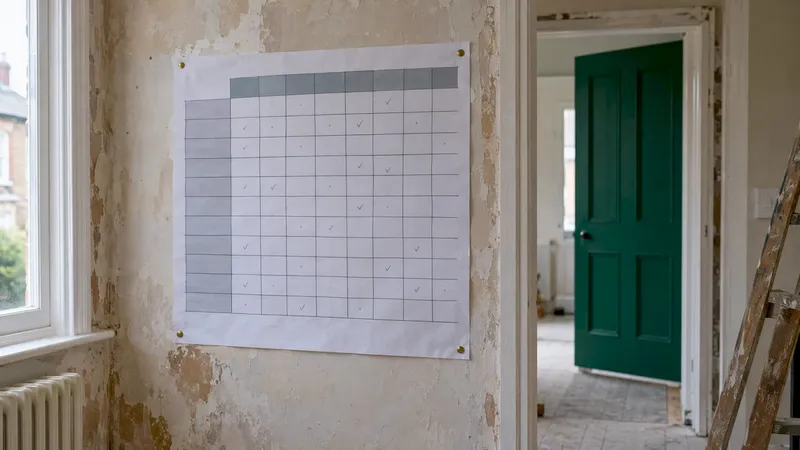
A roles and responsibilities matrix is a simple grid that lists every job on your project down the side, every person or firm across the top, and marks in each cell what that person does about that job. On a home build or renovation it answers the questions that cause most rows: who orders the tiles, who signs off the change, who just needs to be told. Fill it in before work starts, keep it to one page, and make sure every task has exactly one person accountable. Our planning platform keeps the budget, tasks and contractor conversations in one place, so the matrix has something to live alongside.
TL;DR
- A roles and responsibilities matrix is also called a responsibility assignment matrix (RAM) or RACI chart: tasks in rows, people in columns, a letter in each cell.
- R is Responsible (does the work), A is Accountable (owns it and signs it off, one person only), C is Consulted (gives input first), I is Informed (told afterwards).
- For a home project the columns are usually you, your partner, the main contractor, the designer or architect and the specialist trades.
- Build it before work starts, walk through it with everyone, and revisit it whenever scope changes.
- The most common failure is two people accountable for one task, or nobody at all.
Table of Contents
- What a roles and responsibilities matrix actually is
- The four letters, in plain language
- A worked example: a kitchen extension
- How to build your matrix, step by step
- Mistakes that quietly wreck a matrix
- RACI, RASCI, DACI: which letters do you need?
- Making it work on a real site
- Our perspective
- Put your matrix to work in one place
- FAQ
- Sources
What a roles and responsibilities matrix actually is
The names vary, the idea does not. The Praxis Framework describes a responsibility assignment matrix as a chart that links the work to be done with the people, organisations or third parties who will do it, and notes that when it is filled with responsible, accountable, consulted and informed codes it is usually known as a RACI chart. So "roles and responsibilities matrix", "RAM" and "RACI chart" are, for practical purposes, one tool.
The Open University explains the layout plainly: work is listed in the left-hand column and participant roles run along the first row. It also notes that on larger projects you can draw separate matrices at different levels of detail, from whole deliverables down to individual sub-tasks. For a house, that means one overview grid for the project and, if you want, a detailed one for a tricky phase such as the kitchen.
Why bother on a domestic project? Because a home build has the same problem as any project, only with more emotion and your own money. Several firms, two decision-makers at home and a long list of choices all arrive at once. Without a grid, "I thought you were ordering that" becomes a weekly event.
The four letters, in plain language
NHS Scotland's improvement resource gives the cleanest definitions of the four RACI roles. Here they are, translated into house terms:
- Responsible (R): the person or firm who does the task. More than one can be responsible. The electrician is responsible for first-fix wiring.
- Accountable (A): the person with final ownership who approves the result. Normally one per task. A US federal lessons-learned note on the technique puts it memorably: only one person is accountable, so that the buck stops there. On a house, that is often you or your partner for decisions about money and finishes, and the main contractor for the quality of their own build.
- Consulted (C): people who give advice or expertise before a decision is made. Communication goes both ways. The structural engineer is consulted before a wall comes out.
- Informed (I): people who need to know what happened but do not contribute. Communication goes one way. The neighbour-facing site manager might be informed of a delivery slot.
The distinction people get wrong most is Consulted versus Informed. Consulted means work waits for the answer. Informed means you tell them afterwards. If you mark someone C but never actually wait for them, you have created a delay or a grievance.
A worked example: a kitchen extension
Here is a trimmed-down matrix for a couple adding a kitchen extension. The columns are the people involved, the rows are the jobs. Yours will differ, but the pattern of one A per row holds.
| Task | Homeowner 1 | Homeowner 2 | Main contractor | Designer / architect | Electrician | Local authority building control |
|---|---|---|---|---|---|---|
| Agree total budget and contingency | A | R | C | I | I | |
| Final layout and appliance choices | R | A | C | R | C | |
| Building regulations application | A | I | R | R | C | I |
| Order long-lead items (windows, worktops) | C | A | R | C | ||
| First-fix wiring | I | I | A | C | R | |
| Approve any change to scope or price | A | R | R | C | C | |
| Weekly progress update | I | I | A | R | ||
| Snagging and sign-off | A | R | R | C | R |
A few things to notice. Every row has exactly one A. The couple split the roles so that one person owns each decision and the other is not left out: Homeowner 2 is accountable for layout, Homeowner 1 for money. Building regulations approval sits with the local authority's building control team, which is a step the system gives to an authority, so it appears as a column to be kept informed rather than a job anyone on your side can take over. Blank cells are fine: a blank means "not involved", as the AWS guidance on RACI and RASCI matrices puts it.
How to build your matrix, step by step
The University of Nebraska–Lincoln's guide describes the matrix as a document in the spirit of a team charter, created once the team is assembled but before detailed project planning begins. It can be made with the whole team or by the project lead alone. For a home project, that means after you have chosen your contractor and designer and before the programme is fixed. A well-known five-step method from a design software company's RACI guide maps neatly onto it.
1. List every task, not just the big ones
Start with phases (design, permissions, groundwork, structure, first fix, second fix, finishes, snagging), then break each into the jobs that tend to go wrong: ordering, approvals, payments, access, waste removal. The ones that cause trouble are rarely the building work itself. They are the in-between jobs nobody owns, such as chasing a supplier or confirming a tile.
Keep it to about one page. If a phase needs more detail, give it its own grid.
Where it goes wrong: listing only trades. The "who decides the socket positions" line is the one that costs money later.
Where we help: our platform brings budget tracking, project management, product tracking and room mapping together, so the task list you build for the matrix sits next to the figures and the rooms it affects rather than in a separate spreadsheet.
2. List the people and firms across the top
Use roles rather than first names where possible ("Homeowner 1", "Main contractor"), then add the name beside them. List each partner at home separately. Couples are the first place accountability blurs, because both assume the other is deciding.
If you are deciding whether you need a project manager at all, our guide on when to hire a contractor, project manager or platform helps you decide which column that person fills.
3. Assign R, A, C and I, with one A per row
Work across each row and ask in order: who does it, who owns the outcome, who must be asked first, who merely needs telling. Check afterwards that no row has two As and none has zero. If two people feel accountable, split the task until each has one.
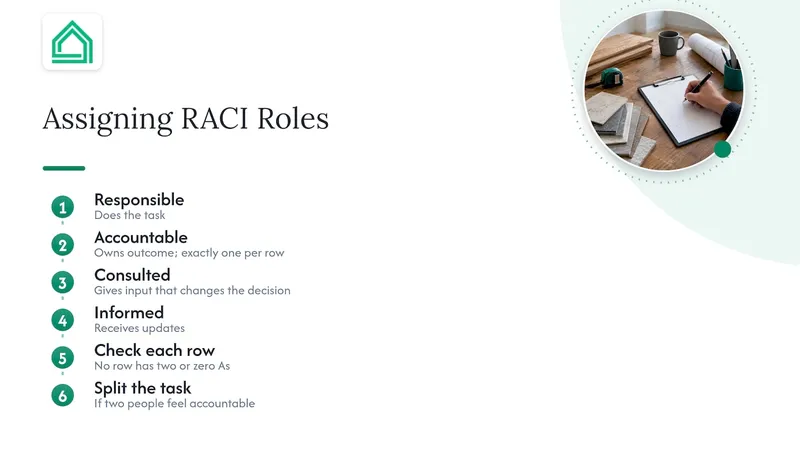
Be sparing with C. If everyone is consulted on everything, nothing moves. Reserve C for people whose input genuinely changes the decision.
Where it goes wrong: making the contractor accountable for decisions that are really yours, such as finishes or budget. Contractors can advise, but a change in scope or price is yours to approve. This is the heart of avoiding costly change orders.
4. Walk everyone through it before work begins
A matrix nobody has seen is a drawing. Parallel Project Training suggests introducing the RACI at the kickoff meeting and walking through key roles so each person understands their own R and A tasks. On a house, that is your first site meeting. Our contractor meeting agenda gives you items to cover alongside it.
Build the grid with your contractor in the room where you can. The Nebraska guide frames the exercise as a way of getting the team to buy in, and notes that even established teams are not automatically on the same page. A contractor who helped draft the matrix is far more likely to follow it than one who is handed it.
5. Review it when things change
Healthcare Improvement Scotland advises creating the matrix once the team and leadership are identified, then reviewing and updating it as the people involved change. On a build, the natural review points are the end of each phase and any time scope shifts. A new subcontractor arrives, a supplier lead time slips, a decision lands on the wrong desk: update the grid and tell everyone.
Pair it with a written record of changes. Our construction document control guide explains how to keep versions and approvals straight, so the matrix and the paperwork agree.
Mistakes that quietly wreck a matrix
From the guides and study material on RACI, the same errors come up again and again. In a home project they look like this:
- Two accountable people on one task. Both partners "own" the bathroom. Neither orders the vanity. Fix: one A, with the other partner as R or C.
- No accountable person. The task falls between the contractor and the designer. Fix: every row gets an A before work starts.
- Confusing A with R. The person who does the job is not always the person who answers for it. An electrician is responsible for the wiring; the main contractor may be accountable for the package.
- Everyone is consulted. Decisions stall while opinions are collected. Keep C for genuine expertise.
- Informed list too long. Updates become noise. Inform only those who need to act on the news.
- Set once, never revisited. The grid describes the project as it was in week one. Review it at phase boundaries and on any change in scope.
- Missing columns. Suppliers, building control and the person at home who handles deliveries are often left out and then become the bottleneck.
- Presented as finished. A matrix handed down without discussion invites quiet resistance. Agree it together.
If an unexpected question lands between two parties, a formal request for information gives it a home, a date and an owner, which is exactly what the matrix is meant to do.
RACI, RASCI, DACI: which letters do you need?
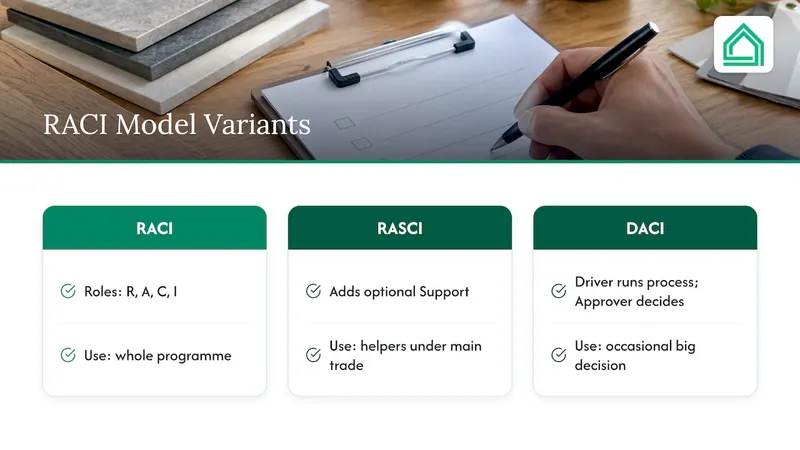
For a house, plain RACI is almost always enough. Two variants are worth knowing.
RASCI adds an optional Support role: someone who helps those who are responsible complete the task. AWS's guidance describes it as an add-on to the four standard roles. On a build, a labourer or an apprentice working under the main trade is a good example. If you find your grid full of "R" for people who are really helping, add the S.
DACI shifts the question from "who does what" to "who decides what". Decikit's explainer says it was developed at Intuit in the 1980s and later popularised by Atlassian, with a Driver running the process and an Approver holding final authority. It is useful for a single large decision, such as choosing between two extension designs, where a RACI row would be too thin. Use RACI for the programme and DACI for the occasional big call.
So has anything "replaced" RACI? Not on a domestic project. These are refinements of the same idea, and the principle that decisions have a single owner holds in all of them.
Making it work on a real site
A few practical habits separate a matrix that gets used from one that gets filed.
Put dates on the handovers. The grid says who orders the windows; your programme says when. Our renovation Gantt chart guide shows how to line the two up so the person marked R for an order knows the deadline.
Name an owner for procurement. Late deliveries are among the most common ways a plan slips. A renovation procurement log gives the accountable person a single list to work from.
Share it where people will look. Taped to the site cabin wall and saved in a shared space is better than buried in an email. A client portal is one way to keep everyone looking at the current version.
Look at how professionals do it. If you want to see how responsibility is split across design, approval and construction on larger jobs, construction project coordination shows how planning, permits and site supervision are handed between parties. Your version can be much smaller, but the logic of one owner per stage carries over.
Keep the contractor relationship collaborative. A matrix is not a way of catching people out. It is a shared promise. Our guide to partnering with contractors in one afternoon shows how to set that tone from the first meeting, and the contractor onboarding checklist covers the references and checks worth doing before anyone is given an R.
Our perspective
We built House A-Z for people who are doing this for the first time and who have, quite reasonably, been handed a spreadsheet and told to get on with it. The grid is a good idea. The trouble is that a stand-alone grid goes stale the moment the budget moves or a product changes.
What we see as the real value of a roles and responsibilities matrix is not the letters. It is the conversation: two partners agreeing who decides what, a contractor hearing exactly where their job ends and yours begins. That conversation is far easier when the budget, the rooms, the products and the tasks are all visible in one place, in plain language, to everyone who needs them.
That is why we put budget tracking, project management and collaboration with partners and contractors in a single platform, rather than leaving you to stitch together several apps. Decide the roles first. Then keep the project where everyone can see it.
Azai
Put your matrix to work in one place
Once your matrix is drawn up, the next job is keeping budget, tasks, products and contractor conversations in line with it. House A-Z brings budget tracking, project management, product tracking and collaboration with partners and contractors into one web and mobile platform. The Free plan covers basic use, Pro is €29 per month, and Enterprise starts from €99 per month for professional contractors and real estate firms. See the plans and pricing to choose what suits your project.
FAQ
What is the difference between a roles and responsibilities matrix and a RACI chart?
They are the same tool under different names. A responsibility assignment matrix links tasks to people, and when its cells use the letters R, A, C and I it is called a RACI chart. A plain roles and responsibilities matrix may use simpler labels such as "leads" and "supports", but the grid is built the same way.
Who should be accountable on a home renovation?
One person per task, always. For decisions about money, design and scope changes, that is usually you or your partner. For the quality and delivery of a package of work, it is normally the main contractor. The rule that matters is that no task has two accountable people or none.
How long should the matrix be?
Keep it to about one page where you can. If a phase such as the kitchen needs more detail, create a second grid for that phase rather than cramming everything into one. A shorter matrix is far more likely to be read and followed.
When should I update it?
Review it at the end of each phase and whenever scope, budget or the people involved change. Tell everyone named in it when something moves, so the version on the wall matches the version in use.
Sources
- Responsibility assignment matrix, Praxis Framework
- RACI matrix, Turas Learn, NHS Scotland
- Lessons Learned: The RACI Diagram Tool, US Office of Population Affairs
- Roles & Responsibilities Matrix, University of Nebraska–Lincoln
- Managing virtual project teams, The Open University
- RASCI matrix, Healthcare Improvement Scotland
- Create a RACI or RASCI matrix, AWS Prescriptive Guidance
- DACI: definition, steps and examples, Decikit
- What Is A RACI Matrix, Figma
- Common Project Kickoff Issues and How to Overcome Them, Parallel Project Training