
AI tools simplify project planning by automating routine tasks, predicting risks before they escalate, and generating structured plans in minutes rather than hours. For first-time builders and renovation teams, this shift is significant. Manual planning methods rely on spreadsheets, disconnected apps, and reactive decision-making. AI in project management replaces that fragmented approach with a single, data-driven process that keeps your project on track from day one. Tools like Teamwork.com, Knowlix, and Ardent Workshop demonstrate how automating project planning produces measurable gains in both time and accuracy.
What are the main AI functionalities that simplify project planning?
AI tools handle the tasks that consume the most time without adding strategic value. The four core capabilities that matter most for project teams are:
- Automated status reporting. AI drafts weekly status reports in under one minute. That removes a task that typically takes a project manager 30–60 minutes per week.
- Predictive risk analysis. AI scans historical data and flags potential delays before they become problems. Teams using AI tools detect risks 25% earlier than those relying on manual reviews.
- AI-generated project roadmaps. AI produces structured task lists, dependencies, and milestones from a brief project description. Setup time drops from hours to minutes.
- Dynamic resource scheduling. AI analyses team capacity and skills in real time, then allocates resources to match project demands without manual recalculation.
These capabilities work together. When your schedule changes, AI updates dependencies automatically. When a risk appears, it surfaces an alert before your next meeting. For home builders managing contractors, material deliveries, and budget milestones simultaneously, that level of coordination is difficult to replicate manually.
Pro Tip: Start by using AI for status reporting only. Once you see how much time it saves, you will have a clear case for expanding to scheduling and risk analysis.

How does AI improve accuracy vs traditional planning methods?
Traditional project planning depends on human memory, manual data entry, and periodic reviews. Each of those steps introduces error and delay. AI removes the dependency on manual input by working continuously against live project data.
| Factor | Traditional planning | AI-assisted planning |
|---|---|---|
| Status report time | 30–60 minutes per week | Under 1 minute |
| Risk detection timing | After delays occur | Up to 25% earlier |
| Schedule updates | Manual recalculation | Autonomous, real-time |
| Project delay rate | Baseline | Reduced by up to 20% |
The numbers tell a clear story. AI-powered tools reduce project delays by up to 20% compared to manual methods. That reduction comes from earlier risk detection, faster schedule adjustments, and fewer errors in task sequencing.
AI also learns from past projects. It analyses patterns across completed work to identify which task combinations typically cause delays. A home renovation team, for example, might not realise that scheduling electrical rough-in before plastering consistently causes a two-day overrun. AI spots that pattern and flags it before it repeats.
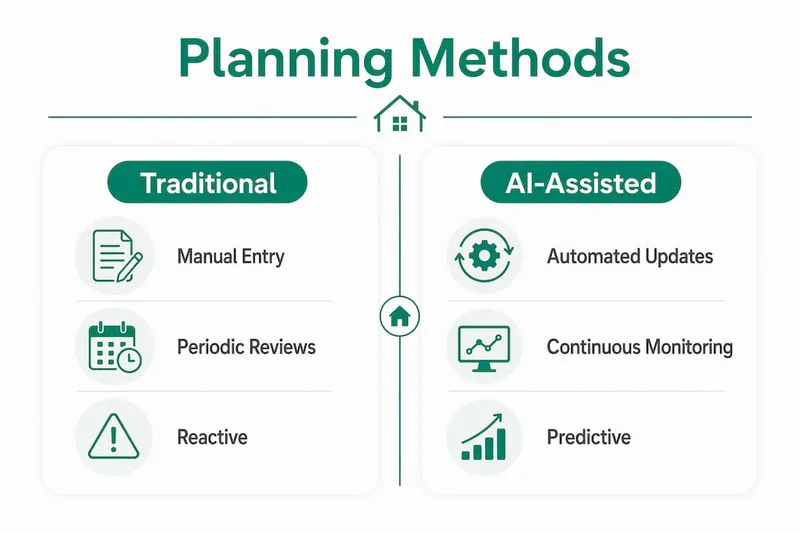
For teams managing construction delays, the shift from reactive to predictive planning is the most valuable change AI delivers. You stop firefighting and start preventing.
What are human-in-the-loop and agentic AI approaches?
Two distinct models of AI in project management are now in active use. Understanding the difference helps you choose the right level of automation for your team.
Human-in-the-loop AI keeps the project manager as the final decision-maker. The AI generates recommendations, drafts reports, and flags risks, but a human reviews and approves every output. The Project Management Institute confirms that human oversight remains essential for nuanced decisions involving stakeholder management and prioritisation. This model suits teams new to AI or working on high-stakes projects where context matters.
Agentic AI operates with greater independence. These systems autonomously update project timelines and recalculate critical paths in real time without waiting for human input. Adoption is growing fast. Currently, 35% of organisations have deployed agentic AI for project management, with 44% planning to follow soon.
The risks of agentic AI are real. Autonomous systems can make scheduling decisions that look correct on paper but ignore context a human would catch. A contractor who is unavailable due to a family emergency, or a material supplier with a known reliability issue, will not appear in the AI's data unless someone adds that information.
Key principles for balanced AI adoption:
- Keep humans responsible for stakeholder communication and budget trade-offs.
- Review AI-generated schedules before sharing them with contractors or clients.
- Set clear rules for when the AI must escalate a decision to a human.
Pro Tip: Treat agentic AI outputs the same way you treat a junior team member's first draft. Review it, correct it, and approve it before it becomes official.
How can teams implement AI tools effectively?
Effective implementation follows a clear sequence. Skipping steps leads to poor outputs and low adoption. Follow this process to get measurable results quickly.
Audit your current workflows. List the five most time-consuming manual tasks your team performs each week. Focus on repetitive, non-billable work such as updating trackers, writing meeting summaries, or recalculating schedules. Targeting these tasks first produces the fastest return.
Define milestones and scope before engaging AI. AI planning tools produce better outputs when they have clear parameters. Successful teams pilot AI on 3–5 core milestones with a defined scope. Vague inputs produce vague plans.
Pilot on status reporting or scheduling. These two tasks offer the clearest before-and-after comparison. You can measure time saved directly and build confidence in the tool before applying it to more complex decisions.
Integrate with your existing tools. AI project management software works best when connected to your calendar, communication tools, and budget tracker. Disconnected AI adds a new silo rather than removing one.
Train your team and set governance rules. Decide who reviews AI outputs, how often, and what triggers a human override. Without governance, AI recommendations can be accepted uncritically, which creates its own risks.
For home builders, applying this sequence to a complete home building timeline means you can use AI to track phase transitions, flag delays in MEP rough-in, and keep your contractor schedule aligned with material deliveries. The practical gains are immediate and visible.
Key takeaways
AI tools reduce project delays by up to 20% through earlier risk detection, automated scheduling, and faster reporting, but human oversight remains essential for decisions involving stakeholder judgement and trade-offs.
| Point | Details |
|---|---|
| Automation saves real time | AI drafts status reports in under one minute, freeing project managers for higher-value work. |
| Risk detection improves | AI identifies potential delays 25% earlier than manual review processes. |
| Human oversight is non-negotiable | Human-in-the-loop practices keep managers in control of stakeholder and budget decisions. |
| Start small, then scale | Pilot AI on 3–5 milestones with clear scope before expanding to full project planning. |
| Agentic AI is growing fast | 35% of organisations already use autonomous AI for project management, with 44% planning to follow. |
AI as a tool, not a replacement: my honest view
The most common mistake I see teams make is treating AI as a decision-maker rather than a capable assistant. AI excels at processing large volumes of data, spotting patterns, and producing first drafts. It does not understand why your main contractor is difficult to work with, or why a particular supplier always delivers late in december. That context lives in your head, not in a dataset.
The shift from analytics AI to agentic AI is real and accelerating. Project managers are becoming supervisors of AI processes rather than manual schedulers. That is a genuine change in role, and it requires a different skill set. You need to know how to evaluate an AI-generated schedule critically, not just accept it because it looks complete.
My advice for teams starting out: resist the urge to automate everything at once. The teams that get the most from AI are those who use it to remove friction from specific, well-defined tasks. They review outputs carefully. They correct the AI when it misses context. Over time, the AI gets better because it is working with better inputs and clearer parameters.
AI in project management is not a shortcut. It is a way to do the same work with less manual effort and fewer errors. The judgement still has to come from you.
— Azai
FAQ
What tasks does AI automate in project planning?
AI automates status reporting, schedule updates, risk flagging, and meeting summaries. These tasks typically consume the most non-billable time for project managers each week.
How much time can AI save on project reporting?
AI tools generate status report drafts in under one minute. That compares to 30–60 minutes for a manually written report, making it one of the highest-impact areas for automation.
Is AI safe to use for critical project decisions?
AI is best used as an assistant for critical decisions, not as the final authority. The Project Management Institute recommends human-in-the-loop practices for stakeholder management and budget prioritisation.
What is agentic AI in project management?
Agentic AI refers to systems that autonomously update schedules, recalculate critical paths, and send alerts without waiting for human input. Currently, 35% of organisations have deployed these systems for project management.
How do I start using AI for my building project?
Audit your five most time-consuming manual tasks first, then pilot AI on status reporting or scheduling. Define clear milestones and scope before engaging the tool to get structured, useful outputs.