Renovation project management is defined as the practice of coordinating tasks, budgets, schedules, and communication across every stage of a build. Understanding how renovation apps consolidate tasks into a single workflow is the difference between a project that runs on time and one that stalls at every handoff. Tools like Buildbite, Home Stories, and Procore replace the chaos of spreadsheets and group chats by centralising all project data into one platform. The result is fewer missed steps, clearer contractor coordination, and far less confusion for you as the homeowner.
How do renovation apps consolidate tasks into phases?
Phase-based scheduling is the core method renovation apps use to organise work. Rather than presenting you with a flat list of jobs, apps like Procore and BuildStackHub structure tasks into ordered stages: demolition, MEP rough-in (mechanical, electrical, and plumbing), inspections, cabinet fitting, tiling, and the final punch list. Each phase only becomes active once its predecessor is complete. That sequencing is not cosmetic. It reflects how real renovation work actually flows.

Task dependencies and sequencing prevent idle time by ensuring trades only arrive on site when conditions are ready for them. A plasterer cannot work before the electrician has completed first-fix wiring. A tiler cannot start before the waterproofing inspection passes. Apps model these relationships explicitly, so you and your contractors always know what is blocking progress and what comes next.
The practical benefit for homeowners is transparency. You can log in at any point and see which phase is active, which tasks are complete, and which are waiting on a dependency. You do not need to chase your contractor for a status update. The app provides it automatically.
- Phase visibility: Active phases are highlighted so every team member knows the current priority.
- Blocker identification: Tasks that are blocking downstream work are flagged clearly, not buried in notes.
- Contractor coordination: Trades receive notifications when their phase becomes active, reducing scheduling gaps.
- Homeowner oversight: You can review each construction phase remotely without interrupting the site team.
Pro Tip: Set up your phase structure before any work begins. Entering tasks retrospectively means you lose the dependency logic that makes the scheduling useful.
How do apps manage change requests between homeowners and contractors?
Change management is one of the most common sources of dispute in renovation projects. A verbal agreement to move a socket or upgrade a worktop sounds simple. Without documentation, it becomes a billing argument three weeks later. Renovation apps solve this by turning every change request into a formal, timestamped record.
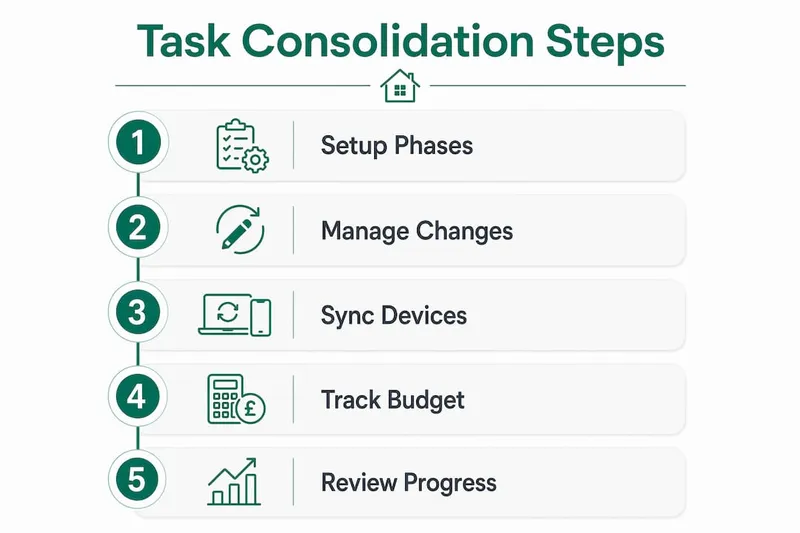
Buildbite, for example, logs client change requests with photos and timestamps, then links each change directly to its impact on the schedule and budget. That connection is critical. You can see immediately whether a requested change adds two days to the timeline or £400 to the cost. Approvals are recorded in the app, not in a text message that gets lost.
Here is how a well-structured change management process works inside a renovation app:
- Request logged: You or your contractor submits a change request with a written description and any supporting photos.
- Impact assessed: The app links the change to the affected tasks and calculates the cost and schedule impact.
- Approval recorded: You approve or decline the change inside the platform. The decision is timestamped and stored.
- Schedule updated: Approved changes automatically adjust the relevant phase and task deadlines.
- Billing supported: The documented change log gives your contractor clear justification for any additional invoice items.
GPS-verified photos tied to change requests add another layer of protection. They turn "was that finished before or after the change?" into a question with a clear, visual answer. This matters most when disputes arise near project completion, when memories are unreliable and money is on the line.
Pro Tip: Never approve a change verbally. Even if your contractor is trustworthy, undocumented approvals create ambiguity that costs both parties time. Use the app's approval function every time, without exception. Read more about managing change orders to understand the full process.
Giving clients their own login to view progress and submit change requests keeps communication transparent and reduces interruptions to the site team. You get visibility without needing to call anyone.
What role does device synchronisation play in task consolidation?
A renovation app is only useful if the data inside it is current. Offline-first functionality combined with automatic device synchronisation solves the most common failure point in digital project tracking: the gap between what is recorded on site and what the homeowner sees at home.
Home Stories operates offline with iCloud sync, keeping progress consistent across iPhone and iPad regardless of whether the site has a reliable internet connection. A contractor logs a task as complete on their phone while on site. When connectivity returns, that update syncs automatically to your tablet at home. You see the same information without any manual transfer.
The table below shows how different device scenarios affect task visibility and data integrity:
| Scenario | Without Sync | With Sync |
|---|---|---|
| Contractor on site, no internet | Updates lost or delayed | Updates saved offline, synced later |
| Homeowner reviewing remotely | Relies on phone calls | Sees live task status on any device |
| Multiple contractors on one project | Risk of conflicting versions | Single source of truth across all devices |
| Progress photos taken on site | Stored locally, easy to lose | Uploaded and linked to tasks automatically |
Secure offline operation protects data integrity when internet access is unavailable. That matters on renovation sites, where connectivity is often patchy and the cost of a missed update can be a delayed inspection or a duplicated material order.
How do renovation apps improve budget tracking alongside tasks?
Budget tracking and task management belong in the same platform. Separating them into different tools is one of the most common mistakes homeowners make. When costs are logged in a spreadsheet and tasks are tracked in a separate app, you lose the connection between what was spent and what was delivered.
Visual budget tracking with real versus estimated cost charts gives you an immediate picture of where the project stands financially. You can see at a glance whether the tiling phase came in under budget or whether the plumbing rough-in has already exceeded its allocation. That visibility lets you make decisions before costs spiral, not after.
Apps that consolidate budgeting with task management typically cover:
- Materials tracking: Log every purchase against the relevant task or phase, including supplier, order date, and lead time.
- Labour costs: Record contractor day rates or fixed quotes alongside the tasks they are completing.
- Real versus estimated comparison: See budget versus actual figures updated as work progresses, not just at invoice stage.
- Material lead time alerts: Apps like BuildStackHub notify the team of delays in material delivery, helping keep schedules realistic.
- Exportable summaries: Download financial records for tax purposes or to share with a quantity surveyor.
Linking costs to tasks also helps you manage hidden renovation costs more effectively. When every expense is attached to a specific phase, unexpected costs are easier to identify and challenge. You can also use the data to build a more accurate contingency for future projects.
Breaking down work into one platform reduces lost information at handoffs and improves accountability across the whole team. That is the practical value of consolidation. It is not about having fewer apps. It is about having fewer gaps where information disappears.
Key takeaways
Renovation apps consolidate tasks most effectively when phase-based scheduling, change management, device synchronisation, and budget tracking are unified in a single platform rather than split across separate tools.
| Point | Details |
|---|---|
| Phase-based scheduling | Structure tasks by demolition, rough-in, inspections, and fit-out to honour real dependencies. |
| Change request logging | Record every approval with timestamps and photos to prevent disputes and scope creep. |
| Offline sync across devices | Use apps with offline-first operation so on-site updates reach homeowners automatically. |
| Budget linked to tasks | Track materials and labour against specific phases to catch overspend before it compounds. |
| Single source of truth | Centralise scheduling, communication, and costs to eliminate gaps at every project handoff. |
Why i think most homeowners adopt apps too late
The most consistent pattern I see is homeowners downloading a renovation app after the project has already started. By that point, the first few phases are undocumented, change requests have been made verbally, and the budget tracking is a rough note in someone's phone. The app becomes a catch-up tool rather than a planning tool, and it never delivers its full value.
The apps that genuinely reduce stress are the ones set up before the first contractor arrives on site. That means entering your phases, assigning your tasks, and agreeing with your contractor that the app is the official record for approvals and changes. That conversation takes twenty minutes. Skipping it costs weeks.
I also think there is a tendency to overestimate how much a homeowner needs versus a professional contractor. Tools like Procore are built for site managers running multiple projects simultaneously. If you are renovating a kitchen or extending a bathroom, you need something closer to Home Stories or a well-configured project management tool with a clear budget view. The complexity of the app should match the complexity of the project.
The feature that consistently gets underused is photo documentation. Attaching a timestamped photo to a completed task takes seconds. It removes every "was that done before or after?" question from the project. For DIY enthusiasts especially, it creates a record you can refer back to when something needs repair years later.
My honest recommendation is to treat the app as the contract, not the conversation. If it is not in the app, it did not happen.
— Azai
FAQ
What does task consolidation mean in renovation apps?
Task consolidation in renovation apps means bringing scheduling, budgeting, communication, and change management into one platform. This creates a single source of truth that reduces errors at every project handoff.
Which apps are best for organising renovation timelines?
Buildbite, Home Stories, and Procore each offer phase-based scheduling and task tracking suited to different project scales. Home Stories suits homeowners managing smaller projects, while Procore and Buildbite are better suited to contractor-led builds.
How do renovation apps prevent scope creep?
Renovation apps prevent scope creep in construction by logging every change request with a timestamp, linking it to cost and schedule impacts, and requiring formal approval before work proceeds. Verbal agreements are replaced by documented records.
Can renovation apps work without an internet connection?
Yes. Apps like Home Stories use offline-first operation, storing updates locally and syncing automatically when connectivity is restored. This keeps on-site progress and remote homeowner views consistent without manual data transfer.
Do renovation apps track both costs and tasks together?
The best renovation planning apps link every cost directly to a task or phase, showing budget versus actual spend in real time. This connection lets you spot overspend during a phase rather than discovering it at the final invoice.