Finding homebuilding project management software that actually simplifies planning, budgeting, and communication between homeowners and contractors is still difficult. Most platforms limit collaborative planning features, restrict access to budget tracking, or depend entirely on generic templates and fixed workflows. This comparison shows specific strengths of three alternatives so you can choose software that matches your homebuilding project needs and collaboration style.
Table of Contents
buildNest
At a Glance
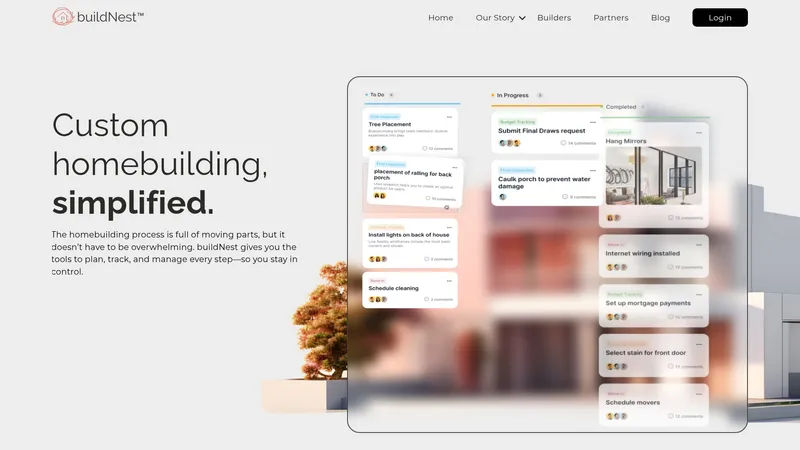
Made with love in Kansas City, buildNest combines planning, budget tracking, and contractor collaboration into a single workspace. The platform highlights real-time updates and document storage to keep approvals and milestones visible to everyone. That mix aims to reduce stress and keep a custom build on schedule and within budget.
Core Features
The platform groups project controls into four clear areas: Task Management with milestones and dependencies, Budget Tracking that monitors expenses in real time, and Real-Time Collaboration for approvals and document storage. Contractor & Vendor Management centralises contacts and responsibilities so decisions and handovers stay recorded. These capabilities work together to keep homeowners and trades aligned during a custom build.
Key Differentiator
The primary distinction is the emphasis on single-place coordination for both homeowners and builders. buildNest concentrates on keeping budgets, tasks, documents, and contractor interactions connected in one view. That focus on end-to-end project visibility sets it apart from tools that only cover one or two parts of construction management.
Pros
The platform simplifies complex homebuilding processes by collecting schedules, budgets, and communications in one place. Its real-time expense monitoring helps spot budget drift early and keeps financial conversations grounded in current figures. Centralising approvals and document storage reduces miscommunications between homeowners, builders, and vendors, which lowers the risk of costly rework.
Cons
Limited public detail about third-party integrations and advanced customisation options makes it hard to assess fit for bespoke workflows.
The product may not suit large-scale or commercial construction, since functionality appears focused on custom residential projects.
Offline access and specialised construction tooling are not described, which could frustrate teams that work predominantly off-grid.
When It May Not Fit
If you manage commercial developments or multi-site build programmes, buildNest may lack the scale or specialised modules you need. If your team requires robust offline mode for remote sites, the platform’s online-first design could cause interruptions. Those needing heavy customisation for niche construction trades should check feature specifics before committing.
Who It's For
Homeowners planning a custom home and wanting a single place to manage budgets and approvals will find the tool relevant. Small builders and independent contractors who collaborate directly with clients will benefit from shared milestones and document workflows. Partner organisations that guide clients through bespoke builds can use buildNest to keep communication transparent.
Real World Use Case
A homeowner uses buildNest to sequence construction milestones, track supplier invoices, and route approvals to a tradesperson. The builder logs progress and attaches site photos to milestone records so the homeowner can approve payments promptly. That workflow keeps decisions documented and reduces disputes over scope and cost.
Pricing
Pricing is listed as Not applicable — informational only. No public tiers or starting figures are provided, so teams should request a demonstration or contact sales for a customised proposal. Expect to discuss volume and feature needs when enquiring about commercial terms.
Website: https://buildnest.ai
Constant Builder
At a Glance
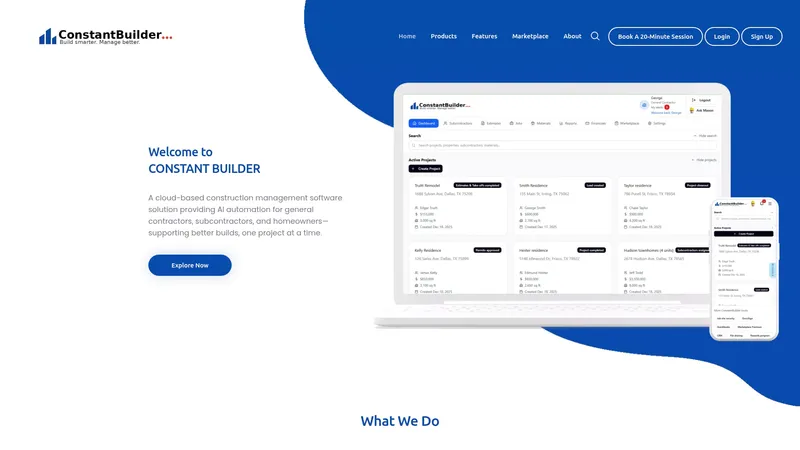
Recognised by industry publications for innovation. Constant Builder pairs AI driven planning with a contractor marketplace and homeowner transparency tools. The vendor positions the product for residential teams who need estimates, scheduling, and warranty tracking in a single cloud based app.
Core Features
Constant Builder offers a cloud based system for residential construction management with AI driven tools for planning, scheduling, and coordination. It manages estimates, bids, and invoices while providing real time project tracking and homeowner visibility through schedules and punch lists. The platform also includes warranty management, a marketplace to find contractors and subcontractors, and a mobile friendly interface for field access.
Key Differentiator
The platform's AI driven tools adapt workflows to construction tasks and schedules rather than forcing generic project templates. That focus targets everyday residential work like bids, change orders, and homeowner updates. The vendor highlights industry recognition for this approach, which explains the product's emphasis on contractor workflows and homeowner communication.
Pros
Constant Builder concentrates on residential needs and bundles estimating, invoicing, scheduling, and warranty tracking in one place. The marketplace can speed the process of finding subcontractors and vendors for trade work. Mobile friendly access gives site managers and subcontractors quick visibility and lets homeowners follow progress. This combination reduces handoffs and clarifies responsibilities on standard house builds.
Cons
Limited information on third party integrations. The product lists a marketplace but offers few details about external tool connections.
Designed mainly for residential projects. Large commercial builders will find features and workflows too narrow.
Requires reliable internet access. The cloud based design reduces offline capability for remote sites.
When It May Not Fit
Builders running large commercial programmes or multi site portfolios will likely outgrow the feature set. Projects that depend on offline field workflows will find the cloud only approach restrictive. Teams that need broad integration with enterprise accounting or ERP systems should expect some manual work or an integration gap.
Who It's For
Residential general contractors, subcontractors, and homeowners who want a single system for bids, schedules, and warranty tracking will find this product relevant. Site managers who rely on mobile updates and homeowners who want schedule visibility also fit well. The product is less relevant to commercial contractors and enterprise procurement teams.
Real World Use Case
A Texas general contractor uses Constant Builder to manage schedules, track change orders, and coordinate subcontractors across several single family builds. The contractor shares schedules and punch lists with homeowners and records warranty items for quick follow up. That workflow reduced confusion on handovers and improved homeowner communication.
Website: https://constantbuilder.com
Comparison of Homebuilding Project Management Platforms
Discovering which homebuilding project management platform offers the most tailored guidance can enhance budgeting, designing, and coordinating tasks effectively.
| Platform | Core Features | Key Differentiator | Pricing | Limitation |
|---|---|---|---|---|
| House A-Z | AI-driven design and budget tools, exportable plans | Personalised AI recommendations for all stages of planning | Free, €29/month Pro, €99/month Enterprise | Not ideal for large-scale projects |
| buildNest | Budget tracking, task management, contractor collaboration | Single-platform coordination for full project visibility | Price not published | Limited options for third-party integrations |
| Constant Builder | Residential-focused scheduling and bid systems | AI tools adapting workflows to standard tasks | Price not published | Internet dependency limits field functionality |
How Can First-Time Builders Avoid Costly Planning Mistakes?
Many first-time builders and renovators feel unsure when organising budgets, designs, and contractor communication. The complexity of juggling spreadsheets, layouts, and permit advice leads to costly errors and delays. House A-Z meets these challenges by offering an intuitive platform where AI agents review your budget, preferences, and timeline to provide personalised recommendations before construction begins.
Experience clarity with all your planning tools in one place and make informed decisions that have saved clients up to €20K in potential mistakes. Take advantage of tailored guidance suitable for novices and small contractors. Visit House A-Z to model your layouts, track costs, and collaborate efficiently with your builder. Try the free tier or move to advanced plans and prepare your project with confidence.
FAQ
What features make House A-Z a suitable choice for first-time builders?
House A-Z provides tailored guidance that simplifies early-stage design for novices. The platform combines AI-driven recommendations for layout, budget, product, and permit advice, making it ideal for users who need personalised support. You can easily start planning your homebuilding project without feeling overwhelmed.
How does House A-Z compare to buildNest in terms of project coordination?
buildNest excels in real-time updates and document tracking, making it valuable for builders needing consistent communication. In contrast, House A-Z focuses on personalised layout and budget advice tailored to first-time builders. This makes House A-Z a better fit for those who require assistance with specific homebuilding elements.
Which platform offers better budget tracking features: House A-Z or Constant Builder?
House A-Z offers integrated budget tracking alongside design tools for a more holistic view of project costs. Constant Builder also features budget management but is primarily designed for tracking invoices and estimates. If you value an integrated approach to design and budgeting, House A-Z may be your best option.
Can House A-Z assist with sharing plans with contractors?
Yes, House A-Z allows you to export plans in formats that contractors expect, which facilitates plan sharing. This feature streamlines the process of collaborating with builders and ensures everyone is on the same page. Expect to find this capability beneficial when managing homebuilding projects.
What pricing tiers does House A-Z offer?
House A-Z provides a free tier for basic planning and community access, alongside a Pro plan priced at €29/month that includes advanced AI recommendations and export features. This pricing allows you to select a plan that best fits your project's needs and budget.