A construction daily log is a same-day, timestamped record of everything that happened on site: who worked, what got built, what materials and plant arrived, the weather, and every issue with its cause, impact and action. It needs at least eight fields to earn its keep: project header, weather at multiple points, crew by trade, plant and equipment status, materials delivered, work completed by location and percentage, issues with quantified impact, and visitors. Written from memory a week later, it stops being a log and becomes guesswork.
TL;DR:
- Daily logs must include multiple weather timestamps to support extension claims and more accurate event reconstruction.
- Recording cause, impact, and action for each issue is essential for dispute resolution and should be detailed and specific.
- Digital tools with offline capture, automatic timestamps, and photo attachments improve consistency and reduce reconstruction risk.
- Writing logs on the same day and sticking to location-specific, factual entries significantly strengthen their credibility in disputes.
- Consistent photo captions linked to specific records can be more effective in resolving disputes than unorganized image folders.
Table of Contents
- What must a construction daily log include?
- Which daily log template should you use?
- How do you write a daily log that holds up?
- What does a completed daily log actually look like?
- Should you go digital or stick with paper logs?
- How are daily logs used in disputes and delay claims?
- Why most site teams get daily logs wrong
- Build reliable daily logs without the spreadsheet chaos
- Sources
- FAQ
What must a construction daily log include?
Every field on the page earns its place because someone, someday, will ask a question it needs to answer. Miss one, and you're reconstructing events from memory during a dispute, which is exactly the scenario a good log exists to prevent.
Header and administrative fields come first: project name and number, site address, the author's name, and the shift start and finish times. These sound like paperwork, but they're what turns a scribbled note into an admissible construction daily log that anyone can trace back to a specific person and a specific day.
Weather needs recording at more than one point in the shift, typically morning, midday and end of day. A single "sunny" entry at 8am tells nobody what happened when the rain arrived at 2pm and stopped concrete pours for three hours. Multiple timestamps are what let you later claim a weather-related extension of time with a straight face.
Work completed should describe location first, then activity, then percentage. A vague "blockwork progressing" tells them nothing three months from now.
Labour gets logged as headcount by trade and by company, plus hours worked. If you subcontract steel fixing and formwork separately, list them separately. Crew notes (a late start, an early finish for a safety briefing) belong here too.
Plant and equipment needs asset IDs, hours used, and idle time with a reason. A crane sitting unused for four hours because of a delivery delay is a fact worth recording. It might matter later when someone asks why the schedule slipped.
Materials delivered and used should carry supplier name, quantity, batch or delivery ticket number, and condition on arrival. If a load of blockwork arrives damaged, note it the day it happens, not when the wall starts cracking six weeks later.
Issues and delays are the highest-value entries in the whole document. Each one needs cause, a quantified impact in hours or days, and the action taken, with names and times attached. Fieldwire's guidance on daily reports treats this pairing of crew counts, weather and progress against a specific date as the backbone of any credible schedule or payment position.
Visitors and inspections round out the entry, with outcomes noted rather than just attendance. A building control officer's visit that results in a snag list is worth more to the record than a bare mention that they came by.
Photographs should carry captions that cross-reference the written entry, not float unlabelled in a folder somewhere.
- Header: project, date, shift times, author
- Weather: morning, midday, end of shift
- Labour: headcount by trade, hours, notes
- Plant: asset ID, hours used, idle time and reason
- Materials: supplier, quantity, batch/ticket number, condition
- Work completed: location, activity, percentage
- Issues: cause, impact, action, names, times
- Visitors: who, purpose, outcome
Pro Tip: Number your grid references and drawing sheets consistently across the whole project before you start logging. It sounds fussy on day one, but it's the difference between a log a claims assessor can follow in ten minutes and one that takes a week to decode.
Which daily log template should you use?
The format you choose depends less on preference and more on how much reconstruction risk you can tolerate. Paper logs are fast to fill in but painful to search when you need three weeks of weather data for a claim. Excel spreadsheets add structure and let you filter by trade or date, but someone still has to type everything in after the shift ends, which invites gaps. PDF forms sit between the two: structured and shareable, but static once printed. Google Sheets brings in real-time collaboration if multiple supervisors update the same project, though it depends on a decent signal. Mobile forms capture data in the field with automatic timestamps, which Autodesk's Digital Builder points to as the format that cuts reconstruction risk the most, because entries get made while the memory is fresh rather than reassembled at a desk.
A minimal field template covers the eight essentials above and suits a small residential extension where the risk of a dispute is low. An expanded template adds batch numbers for every material delivery, named idle-time reasons for every piece of plant, and a running photo index. That level of detail belongs on commercial jobs with multiple subcontractors and a real chance of a delay claim.
Before adopting any template, run through a short checklist:
- Does it force a timestamp on every entry, not just the header?
- Does it have a dedicated field for cause, impact and action on issues?
- Can you filter or search past entries by trade, date or location?
- Does it support photo attachments linked to specific entries?
Templates should scale with project risk. A full materials and equipment log suits high-value commercial work, while a lighter version is fine where the contract value and dispute exposure are both low.
How do you write a daily log that holds up?
Three habits separate a log that survives scrutiny from one that gets picked apart in adjudication.
- Write it the same day, with a timestamp and your name attached. Entries reconstructed from memory a week later carry far less weight than same-day records, because a reconstruction is, by definition, a guess dressed up as fact.
- Stick to what happened, where, who was involved, and when. "Formwork delayed" is an opinion. "Formwork on Grid B2 delayed from 9am to 1pm, waiting on crane availability" is a fact anyone can check against the crane log.
- For every issue, record cause, quantified impact, and action. Banamind's guidance on daily logs treats this three-part structure as the minimum for a log entry to be useful in adjudication. A note that just says "delay due to rain" is nearly worthless without the hours lost and what you did about it.
Link every photo to its written entry with a caption that states location, date and what the image shows, rather than letting images sit in a separate, unlabelled folder. And agree standardised short phrases across your crew, so "idle" always means the same thing to every supervisor filling in the log, whether that's you on a Monday or your deputy on a Friday.
Pro Tip: When recording a delay, note the exact time lost to the nearest 15 minutes rather than rounding to "half a day". Assessors trust precision, and vague rounding is one of the fastest ways to make an otherwise solid entry look padded.
Consistency across a crew matters as much as accuracy from any one person. If five supervisors each log delays differently, whoever reviews the project later has to translate five formats into one story, and something always gets lost in translation.
What does a completed daily log actually look like?
Here's a single annotated entry showing how the fields come together in practice.
| Field | Entry | Why it's phrased this way |
|---|---|---|
| Project / date | Riverside Extension | Ties the record to a specific job and day, no ambiguity |
| Author / shift | J. Okafor | Names the person accountable for the entry |
| Weather | morning clear, midday light rain, afternoon heavy rain | Multiple timestamps support a later weather-extension claim |
| Labour | 2 bricklayers (ABC Masonry), 1 labourer, hours worked noted | Headcount and hours by trade and company, auditable |
| Plant | Telehandler, hours used and idle time with reason recorded | Idle time with a stated reason, not just a number |
| Materials | blocks delivered, supplier named, ticket number recorded, condition noted | Supplier and ticket number make the delivery traceable |
| Work completed | Grid C, blockwork, percentage complete recorded | Location plus percentage, checkable against drawings |
| Issue | Rain halted blockwork; delay time recorded; crew reassigned with authorisation noted | Cause, quantified impact, action, name and time, all present |
| Visitor | Building control visited, outcome noted | Outcome recorded, not just attendance |
Keep a blank version of this structure as a CSV for quick data entry and a PDF version for printing or sharing with clients who want a static record. The blank template should mirror every column here exactly, so nobody has to invent a field halfway through a shift.
Should you go digital or stick with paper logs?
Digital logs win on searchability and evidence integrity. Entries carry automatic timestamps, photos attach directly to the record rather than living in a separate folder, and you can pull three months of weather data in seconds instead of flicking through a stack of paper. Autodesk's research on construction daily reports points to mobile capture as the format that most reduces the reconstruction burden, because supervisors log events in the field rather than typing them up hours later from memory.

Paper still has a place where connectivity is unreliable or where a crew simply hasn't adopted mobile tools yet. The trade-offs are real: patchy signal on remote sites, the cost of managing devices, and a training curve for anyone used to a clipboard. Real-time field data tends to pay off once a crew gets past that initial friction.
A sensible migration looks like this:
- Pilot digital capture on the core fields only (weather, labour, issues) before adding every possible column
- Build a template that mirrors your existing paper form, so nobody has to relearn the whole process at once
- Choose a tool with offline capture, so a dead signal on site doesn't stop entries being made
- Confirm exports include immutable timestamps and user IDs before you retire the paper trail entirely
How are daily logs used in disputes and delay claims?
Adjudicators and claims handlers look for one thing above all: a clear, dated chronology that ties cause to effect without gaps. A log that says "delayed today" carries almost no weight next to one that says "delayed 45 minutes from 15:30, rain, crew reassigned by J. Okafor." The second version gives a reviewer something to check against weather records, plant logs and labour timesheets.
The weakest logs share the same faults: entries written days after the fact, issues logged without a quantified impact, and photos that float unattached to any written record. Fixing all three is mostly a matter of habit, not tooling.
- Export logs with metadata intact: timestamps, author ID, and any edit history
- Keep photo files with their original filenames and timestamps rather than renaming them for tidiness
- Back up exports off the site device, ideally to a system with version history
- Cross-reference each issue entry to the change order it eventually generates, if one does
Contemporaneous, specific entries consistently carry more weight in adjudication than records assembled later from memory, and that gap tends to widen the longer a claim drags on. Good document control practice treats the daily log as the anchor for every other project record, not a standalone chore.
Why most site teams get daily logs wrong
Most site teams treat the daily log as an afterthought, something filled in at 5pm from a mental checklist rather than captured as the day unfolds. That's backwards. The log isn't a compliance form to tick off before you go home; it's the only record that can tell your version of events with any credibility months later, when memories have faded and everyone involved has moved on to other jobs.
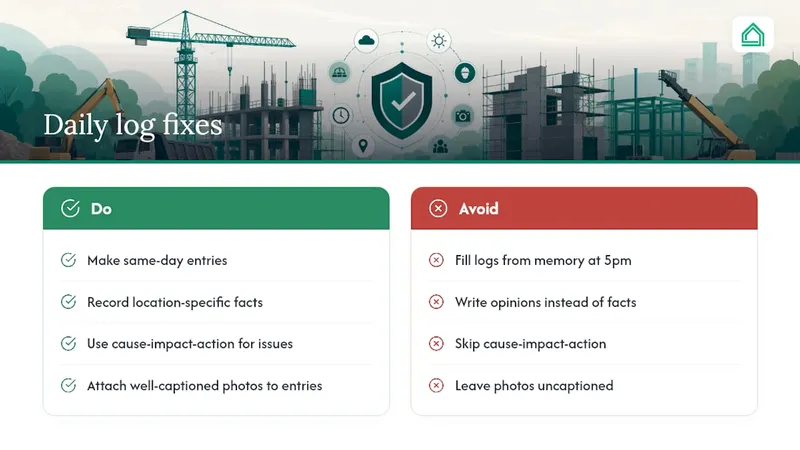
The conventional advice tells you to "be thorough," which is true but useless on its own. What actually separates a defensible log from a liability is discipline around three narrow habits: same-day entries, location-specific facts instead of opinions, and the cause-impact-action structure on every issue. Get those three right and the rest of the form almost fills itself in. Get them wrong and no amount of extra detail elsewhere rescues the entry.
Photo documentation deserves more respect than it usually gets, too. A well-captioned image tied to a specific log entry, following the same discipline as good renovation photo documentation, often does more to settle a dispute than a paragraph of text.
— Azai
Build reliable daily logs without the spreadsheet chaos
Juggling a paper diary, a separate photo folder, and a spreadsheet for materials tracking is how gaps creep into a project record. A suitable digital platform brings templates, timestamped entries, photo attachments and exportable reports into one place, so your daily logs stay consistent whether you're on a first renovation or managing several contractors at once. AI agents can flag missing fields and help translate site notes into the structured detail that holds up when a delay claim lands on your desk. If you're tired of reconstructing last Tuesday's weather from memory, try the House A-Z agents and start logging your next shift properly today.
Sources
- Construction Daily Log: What It Is, What Goes In, and Why It Matters
- How to create winning daily reports in construction - Digital Builder (Autodesk)
- Construction Daily Log: What to Include & How to Write It | Banamind
- Construction daily report template for the jobsite | Fieldwire by Hilti
FAQ
What are some good daily log apps for construction?
Look for a tool that timestamps entries automatically, supports photo attachments linked to specific records, and allows offline capture for sites with patchy signal. Some platforms offer AI-powered agents covering templates, timestamping and export in one interface, which suits teams moving off paper for the first time.
How do I create a daily report?
Start with the header fields (project, date, author, shift times), then log weather at multiple points, crew and plant status, materials delivered, work completed by location and percentage, and any issues with cause, impact and action. Write it the same day the work happens, not from memory afterwards.
How do I keep track of construction projects?
Tie your daily log to your wider project documentation, including change orders and photo records, so progress, delays and decisions all reference the same dated entries. A construction daily log that's linked to your document control system does most of the tracking work automatically.
What's the best free construction schedule app?
Free tiers vary in what they cover, but the ones worth using support at minimum a daily log with timestamps and photo attachments, since that's the record you'll rely on if a schedule dispute arises. Some tools offer free plans covering core planning and logging features suitable for first-time builders testing the format before committing to a paid tier.