Use an editable spreadsheet, Excel or Google Sheets, for live projects, and reserve a locked PDF for client or contractor sign-off. Excel suits offline work and formulas; Google Sheets suits teams updating it together in real time.
- Excel or Google Sheets — for active tracking, ordering, and edits
- Editable PDF — for formal sign-off copies once selections are locked
- Canva or design files — for client-facing presentation boards
If you'd rather not juggle files across a whole project, House A-Z folds this tracking into one collaborative workspace.
Key Takeaways
A finish schedule only works if it has the right columns, a consistent legend, one clear owner, and updates that keep pace with the project.
| Point | Details |
|---|---|
| Choose the right format | Use Excel or Google Sheets for live tracking; reserve editable PDFs for sign-off copies. |
| Include every core field | Room, material, manufacturer, code, colour, size, quantity, supplier contact, and image reference are non-negotiable. |
| Use a compact legend | Short codes like PT-1 or FL-2, mapped once to a full description, keep schedules readable and drawings uncluttered. |
| Start early and assign an owner | Begin at the selection phase, update at ordering and handover, and name one keeper for the master file. |
| Consider an integrated platform | House A-Z links finish schedules to budget tracking and supplier collaboration once a project outgrows a static spreadsheet. |
Table of Contents
- What goes into a finish schedule template?
- Where can you download a reliable finish schedule template?
- How do you customise a finish schedule template quickly?
- Why does a coded legend matter for finishes?
- Who owns the schedule, and when should it start?
- Why consider an integrated platform over static files?
- What mistakes wreck a finish schedule most often?
- Do residential, commercial, and renovation projects need different templates?
- How should you share a finish schedule with trades and suppliers?
- How do you manage revisions without losing track?
- Can a finish schedule connect to BIM or project management software?
- What renovators consistently get wrong about finish schedules
- How House A-Z helps once your schedule outgrows a spreadsheet
- Sources
- FAQ
What goes into a finish schedule template?
A finish schedule earns its place on a project only if it answers one question instantly: what exactly gets ordered, from whom, and where does it go? Interior finish schedule templates typically carry room, finish element, manufacturer, product number, colour or finish, size, quantity, and installation notes, alongside an image or sample reference so nobody orders from memory.
Here's the minimum column set worth insisting on:
- Room or location — where the finish actually lands (e.g. "Ensuite, first floor")
- Finish element — what's being finished (wall, floor, skirting, door)
- Material — the physical substance (porcelain tile, oak veneer, matt emulsion)
- Manufacturer and product code — the exact SKU, not a generic description
- Colour or finish — including any batch or tone reference
- Size or dimensions — tile format, board width, sheet size
- Quantity — with wastage allowance noted separately
- Installation notes — grout width, fixing method, substrate prep
- Supplier contact — name and number, so a site manager isn't hunting for it
- Image or sample reference — a swatch photo or link to the spec sheet
Picture a sample row: "Ensuite floor, FL-2, porcelain tile, Manufacturer X, code 4471, Matt Grey, 600x600mm, 12m², adhesive fixed with 2mm grout, Supplier Y, 0117 xxx xxxx." That single line tells three different trades everything they need without a phone call.
Larger projects benefit from optional extras: lead time, cost per unit, and internal SKU references for reordering.
Pro Tip: Add a "confirmed" checkbox column. It sounds trivial, but it stops half-decided finishes slipping into an order because nobody flagged them as pending.
Where can you download a reliable finish schedule template?
Format choice comes down to how the file gets used, not personal preference. Excel handles formulas and works offline on-site. Google Sheets wins when several people, designer, client, contractor, need to see updates the moment they happen. Editable PDFs suit formal sign-off, once finishes are locked, nobody wants them drifting. Canva or similar design files suit presentation boards for client meetings, not day-to-day tracking.
Before downloading anything, check for three things:
- All the core fields listed above, not a stripped-down version missing supplier or product code
- Genuine editability, not a flattened image pretending to be a spreadsheet
- A sample row already filled in, so you can see how the columns are meant to work
Template marketplaces and bundles often package Excel and Google Sheets versions together, which is worth checking before you pay for anything. Government plan-check documents are a useful reality check too: a Nevada County finish schedule template specifically instructs applicants to name brands and colours wherever possible, which is exactly the discipline a home renovation schedule needs.
Once you've settled on a file, keep a "master" version untouched and duplicate it per project, naming copies clearly (e.g. "FinishSchedule_KitchenExt_v2") so nobody edits the template you'll reuse next time.
How do you customise a finish schedule template quickly?
Adapting a downloaded template rarely takes more than an hour if you work through it in order rather than tweaking columns at random.
- Audit your rooms — list every space needing finishes before touching the spreadsheet
- Pick your mandatory columns — strip anything irrelevant to your project scale
- Add supplier and contact details — fill these in as soon as quotes come back, not later
- Insert samples or images — even a phone photo pasted into a cell beats a text description
- Protect formula cells — lock quantity or cost calculations so a stray edit doesn't break them
- Set sharing permissions — decide who can edit versus who only views
Naming conventions matter more than most people expect. "Grey tile" means nothing to a supplier; "PT-3, Farrow & Ball Downpipe, matt emulsion" means everything. Consistent naming across the schedule prevents duplicate orders and mismatched batches.
Pro Tip: Before sharing the template with trades, fill in three or four sample rows yourself and send it to one contractor for a read-through. Errors surface faster when someone outside the project tries to use it.
Why does a coded legend matter for finishes?
A legend is simply a short code, PT-1, FL-2, WD-3, that stands in for a full material description, mapped once to that description elsewhere in the schedule. Architect Bob Borson has written about finish schedules and stresses that a clear legend system is what keeps a schedule manageable rather than a mess of repeated text across dozens of drawing sheets.
A well-organised legend, with each code mapped once to its full description, keeps drawings uncluttered and keeps a finish schedule usable across a whole project rather than a document only the person who built it can read.
Good coding follows a few simple rules:
- Keep codes short: two letters plus a number (PT-1, not PAINT-KITCHEN-01)
- Map every code to its full description exactly once in the schedule, never repeated elsewhere
- Note the supplier and colour reference against the code itself, not scattered across the document
A compact legend also saves genuine drawing space, since a code takes a fraction of the room a full description would.
Who owns the schedule, and when should it start?
Ownership matters more than most people realise: without one named keeper, a finish schedule drifts, and drift is where ordering mistakes creep in.
- Assign one keeper — usually the designer or project manager, who updates the master copy
- Start at the selection phase — before ordering, not once site work begins; starting early prevents the scramble that causes delays
- Update at fixed triggers — every time an order is placed, every time site handover approaches
- Log lead times and minimum order quantities — alongside a simple cost-per-unit column, so budget risk is visible early
Templates that build in lead time and supplier contact columns are particularly useful on renovations where long-lead items, bespoke joinery, imported stone, can quietly derail a programme.
A schedule that tracks lead times properly gives you weeks of warning on a delay you'd otherwise discover on-site, when it's far more expensive to fix.
Why consider an integrated platform over static files?
Static spreadsheets and PDFs do the job, until three people are editing different copies and nobody notices the tile order went out at the wrong quantity. An integrated platform keeps one live version, linked to budget and supplier data, with a visible audit trail of every change.
- Live updates replace the "which version is current" guesswork of emailed spreadsheets
- Supplier links and budget tracking sit in the same view as the finish selections themselves
- House A-Z's AI agents flag costly mismatches early, the kind of error that has reportedly saved some users upwards of €20,000 in avoidable mistakes
- Multi-trade projects with long lead items and tight budgets benefit most from this kind of oversight
Static templates still work well for smaller jobs. The trade-off appears once several trades, suppliers, and a real budget ceiling are all in play at once.
What mistakes wreck a finish schedule most often?
The most common failure is starting the schedule too late, once orders are already needed, which turns a planning document into a panic list. Selections made under time pressure tend to default to whatever's in stock rather than what was actually specified.
Missing supplier contacts cause the second-biggest headache. A schedule with a product code but no phone number or account reference forces someone to hunt down ordering details mid-project, exactly when speed matters most.
Inconsistent naming is a quieter but equally expensive problem. If one row calls a paint "Kitchen Grey" and another calls the same product "PT-2", a contractor working from a printed extract may order the wrong batch entirely. Colour and batch mismatches on tiling and paint are among the most frequent, and most visible, site errors.
Vague quantities cause overordering or, worse, underordering on items with long lead times. A schedule that says "tile, kitchen floor" without square metreage or wastage allowance leaves ordering to guesswork.
Finally, many schedules never get updated once site work starts. Selections change, substitutions happen because a product goes out of stock, and if nobody updates the master copy, the version site teams are working from quietly diverges from reality. A schedule is only as useful as its last edit, and a schedule nobody maintains becomes actively misleading rather than simply outdated.
Do residential, commercial, and renovation projects need different templates?
The core columns barely change across project types, room, material, code, supplier, but the emphasis shifts.

A residential new-build schedule tends to be organised room by room, with a heavier weighting on decorative finishes: paint colours, flooring, tile, and joinery hardware. Homeowners often want an image or sample swatch against every row, since they're choosing on appearance as much as specification.
Commercial fit-outs usually need extra columns for compliance: fire rating, slip resistance, acoustic performance, particularly in shared or public spaces. Quantities also scale differently, a commercial schedule might specify finishes across dozens of identical rooms rather than one bespoke space, so a single template row can apply across multiple locations with a location list rather than a repeated entry.
Renovation projects carry the trickiest requirement: matching existing finishes. A renovation schedule often needs a "match existing" column noting whether a product is being replicated, discontinued, or substituted, plus tighter lead-time tracking since renovations frequently uncover surprises (a rotten subfloor, an unexpected asbestos test) that push material orders later than planned.
Across all three, the government plan-check template referenced earlier shows a useful discipline worth borrowing regardless of project type: specify brand names and colours explicitly wherever possible, rather than a generic description that leaves room for interpretation on-site.
How should you share a finish schedule with trades and suppliers?
A finish schedule that only the designer understands isn't doing its job. The point is for a site manager, a tiler, and a supplier's order desk to all read the same row and reach the same conclusion.
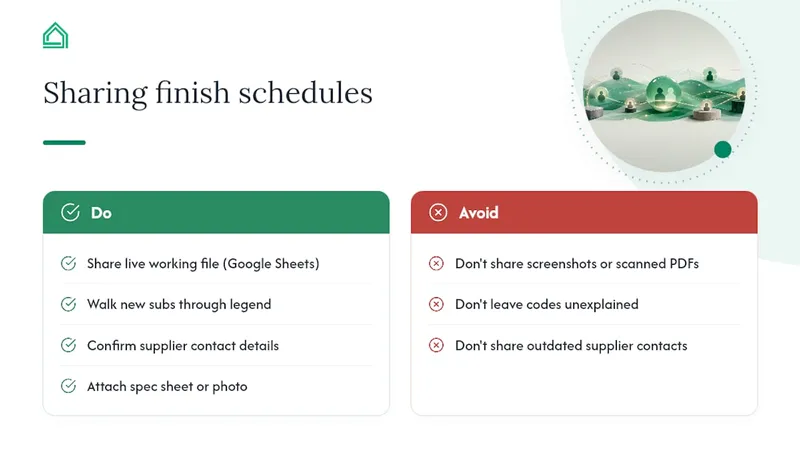
Share a working copy, not just a screenshot. Trades need to search, filter, and check off items as they're ordered, which a static image or scanned PDF simply won't allow. Google Sheets works well here precisely because multiple trades can view live status without emailing for the latest version.
Walk new subcontractors through the legend before handing over the file. A coded schedule (PT-1, FL-2) is efficient once everyone knows what the codes mean, but confusing to anyone seeing it cold. Five minutes explaining the coding system on day one saves far more time than answering the same question by text message three weeks later.
Confirm supplier details are current before sharing externally. A supplier contact that's a year out of date, a rep who's moved on, a phone number that's changed, turns a helpful schedule into a dead end for whoever's trying to place the order.
Where possible, attach the actual product spec sheet or a photo of the sample board alongside the schedule rather than relying on a text description alone. Doors and hardware finishes in particular benefit from a visual reference; a supplier such as those covering interior door trends will often confirm stock and lead time faster against a photo than a written spec.
How do you manage revisions without losing track?
Changes are inevitable, a product goes out of stock, a client changes their mind, a substitution gets approved on-site. The mistake isn't making the change; it's failing to record it clearly.
Keep a simple revision log, even just a column noting the date and reason for any change, rather than silently overwriting the original entry. That way, if a query comes up weeks later about why a different tile arrived, there's a clear paper trail rather than a guessing game.
Version numbers in the file name matter more than they seem to. "FinishSchedule_v3" tells everyone at a glance that this supersedes v2, and prevents the classic mistake of a contractor ordering from an outdated copy still sitting in their inbox.
Set a rule that only the schedule keeper edits the master file, while trades and suppliers work from view-only or commented copies. This avoids the multiple-conflicting-versions problem that static spreadsheets are particularly prone to once more than two or three people start editing directly.
Flag any change that affects lead time or cost immediately, not at the next scheduled update. A late substitution on a long-lead item is exactly the kind of change that needs same-day visibility, not a note that gets added when someone next opens the file.
Can a finish schedule connect to BIM or project management software?
On larger or design-led projects, a finish schedule increasingly needs to talk to other systems rather than sit as an isolated file. Linking finish data to a BIM model means every material selection ties directly to a specific element in the 3D model, so a change to a floor finish updates consistently across drawings, schedules, and quantity take-offs rather than requiring three separate manual edits.
Construction management platforms often accept imported schedule data too, letting procurement, budget tracking, and site scheduling reference the same finish information rather than duplicating it across disconnected tools. This matters most on projects with several trades ordering simultaneously, where a finish change needs to ripple through budget and ordering systems immediately rather than after someone remembers to update every file separately.
For most residential renovations, this level of integration is unnecessary, a well-maintained spreadsheet does the job. It becomes valuable once a project involves multiple stakeholders, a formal BIM workflow, or a budget tight enough that any ordering error has real financial consequence. This is also where a platform like House A-Z bridges the gap between a static file and a full BIM system: it keeps finish selections linked to budget and supplier data without requiring the modelling overhead a BIM platform demands.
What renovators consistently get wrong about finish schedules
The gap I keep noticing isn't in the big decisions, it's the missing supplier contact or SKU on a row that otherwise looks complete. That single omission is what turns a five-minute reorder into a half-day phone hunt. Fill in supplier and product code for every single line, even ones that feel obvious at the time.
Sources
- Architectural Graphics 101: Finish Schedules — Life of an Architect
- Templateworksheet
- Finish schedule template | AT A GLANCE
- Food Facility Plan Check - Finish Schedule Template — Nevada County
FAQ
What is included in a finish schedule?
A finish schedule includes room or location, finish element, material, manufacturer, product code, colour or finish, size, quantity, installation notes, supplier contact, and an image or sample reference.
Is there a free schedule template I can use?
Yes, template marketplaces and architectural resource pages offer free or low-cost editable Excel and Google Sheets finish schedule templates, though it's worth checking each one includes the core fields before relying on it.
Where can I find a free construction schedule template?
Government plan-check pages and architectural blogs often publish downloadable examples with standard fields already filled in, useful as a baseline even outside their original context.
How do I create a schedule template?
Audit every room needing finishes, pick your mandatory columns, add supplier contacts, insert sample images, then test the template with a few filled-in rows before sharing it with trades. Platforms such as House A-Z can also generate a working schedule structure automatically, linked to your budget from the start.