A prime cost (PC) item is a contract allowance for the supply of a specific product you haven't chosen yet, such as tiles or a kitchen tap, with costs you can estimate using a Roofing Cost Calculator for similar contracting supplies. Once you pick the actual item, the real invoice replaces the estimate, and your contract price shifts up or down to match. Get comfortable with this mechanism early, because it's one of the quietest ways a fixed-price build stops being fixed.
TL;DR:
- Most prime cost allowances are intentionally set low to create an attractive headline contract, increasing the risk of significant final-cost overruns.
- The margin applied by builders on excess costs can substantially inflate your final bill beyond the supplier invoice amount, often by a large percentage.
- Fixing product choices before signing the contract eliminates the allowance gap and prevents unexpected margin charges on unused allowances.
- Tracking actual supplier quotes against allowances early can help identify potential overspends before the final invoice arrives.
- Limiting the number of prime cost items in your contract reduces cumulative risk and complexity in managing changes and costs.
Table of Contents
- What is a prime cost item in a building contract?
- What items are usually listed as prime costs?
- How are prime cost items different from provisional sums?
- How are prime cost allowances reconciled at the end of a job?
- What is the allowance trap and how do you avoid it?
- What should you check in your contract before signing?
- How House A-Z helps you manage prime cost allowances
- Why the standard PC advice undersells the real risk
- Try House A-Z to keep your allowances honest
- Sources
- FAQ
What is a prime cost item in a building contract?
A prime cost item, sometimes called a PC sum or PC allowance, is a placeholder figure written into your contract for a product that hasn't been selected at signing. Think of it as an educated guess the builder makes so the total contract price can still be quoted upfront, even when you haven't chosen the bathroom basin yet.
Crucially, PC allowances are supply-only. They cover the delivered cost of the material or fitting itself, not the labour to install it, and not the builder's overheads or profit margin on that labour. The Association of South African Quantity Surveyors defines prime cost amounts in exactly this way: an allowance for the goods themselves, with attendance, handling, and profit priced separately by the contractor.
PC items live in a specific schedule attached to the contract, usually prepared or checked by a quantity surveyor or cost consultant. That person's job is to set allowances that reflect realistic market prices, not figures pulled from thin air to make the headline quote look attractive.
What items are usually listed as prime costs?
Certain trades and finishes get chosen late in a project, almost always after the contract is signed, which is exactly why they end up as PC items. You'll typically see them attached to:
- Kitchen appliances (ovens, cooktops, rangehoods)
- Sanitaryware (toilets, basins, baths)
- Tiles (floor and wall finishes)
- Taps and tapware
- Light fittings
- Door hardware (handles, hinges, locks)
Each one is supply-only, and each one carries its own risk of drifting from the original estimate. The trouble compounds when a contract lists a dozen or more PC items at once. Small overshoots on tiles, a tap upgrade here, a pendant light there, and the cumulative effect on your final bill can be far larger than any single line item suggests.
How are prime cost items different from provisional sums?
Provisional sums cover an entirely different kind of uncertainty. Where a PC item is a supply-only allowance for a defined product, a provisional sum is an estimate for work that isn't fully scoped yet, and it often bundles materials and labour together. NRM and JBCC based guidance frames the split clearly: PC sums are for known products with unknown selections, while provisional sums cover less-defined works such as site excavation that might hit rock, or electrical rewiring behind a wall no one has opened yet.
The practical test is simple:
- Supply-only, product not yet chosen? That's a prime cost item.
- Scope of work itself still undefined? That's a provisional sum.
Adjustment mechanics differ too. A PC item reconciles against an actual supplier invoice for a physical product. A provisional sum reconciles against the actual cost of completing a piece of work, which might include unexpected labour, access issues, or additional materials nobody could price in advance. If your contract schedule blurs these two together, that's worth raising with your builder before you sign anything. House A-Z's guide on provisional sums walks through the checks worth running on that side of the ledger.
How are prime cost allowances reconciled at the end of a job?
The process runs in a fairly fixed sequence. You select the actual product, the supplier issues an invoice, and that invoice is compared against the original PC allowance in your contract. If the real cost is higher, the difference gets added to your final contract sum. If it's lower, you're usually entitled to a credit.
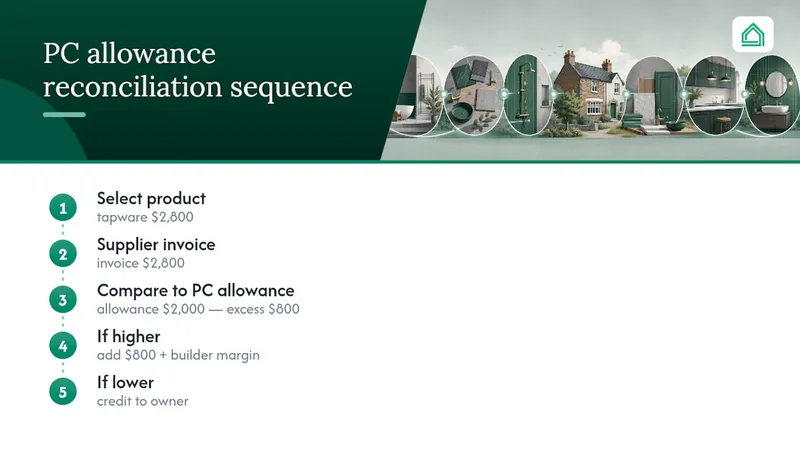
Here's where many homeowners get caught out: builders commonly apply their standard margin, often a substantial percentage, to any amount above the allowance. That's standard industry practice, confirmed by HIA guidance on prime cost and provisional sum items, and it's rarely spelled out in plain language on the quote itself. The allowance figure typically excludes that margin, so it appears smaller and tidier than the real cost you'll eventually pay.
A quick worked example makes this concrete. Say your contract carries a $2,000 PC allowance for tapware, and you fall in love with a set costing $2,800. That's an $800 excess. Multiply that pattern across six or seven PC items and the gap between your signed price and your actual bill can grow substantially.
What is the allowance trap and how do you avoid it?
Some PC allowances are deliberately set low to make a competing quote look cheaper on paper. This is the allowance trap, and it's one of the most common ways a headline contract price and your final invoice end up telling two very different stories. Builtly's guide to prime cost items flags this as a major driver of cost overruns on renovation and new build projects.
Protecting yourself starts before you sign, not after.
- Price each PC item against real retail or trade quotes, not the builder's suggested figure alone.
- Ask for evidence behind any allowance that looks suspiciously low.
- Negotiate allowance levels upward where your research shows a gap.
- Limit the total number of PC items in your contract wherever possible.
Pro Tip: Where you can, replace a PC allowance with a fixed, nominated product before signing. Once it's fixed, there's no allowance to blow through, and no margin to pay on an excess that no longer exists.
For total PC exposure you can't eliminate, budget a contingency of a significant proportion on top of the PC schedule, a range Builtly's research points to as realistic depending on how many items remain unselected.
What should you check in your contract before signing?
Run through this checklist with your contract in hand, ideally before you sign, not after the first progress claim arrives.
- Read the exact schedule wording for each PC item, confirming it states supply-only and names what's excluded.
- Confirm GST and margin treatment on any excess, since this is where costs quietly balloon.
- Ask who sources the item (you or the builder) and whether that affects pricing or timing.
- Request the evidence behind each allowance, such as a supplier quote the figure was based on.
- Fix your selections as early as possible, ideally before signing, to convert PC items into fixed prices.
- Ask about credits, specifically how underspend against an allowance gets returned to you.
Timing matters more than most homeowners expect. A tile selection made in week one of contract negotiations can be locked in as a fixed price. The same selection made in week twelve, mid build, arrives with a margin attached and far less room to negotiate.
How House A-Z helps you manage prime cost allowances
Tracking a dozen PC items across spreadsheets and separate supplier tabs is exactly the kind of chaos House A-Z was built to remove. Its budget tracker lets you import your PC schedule directly, then log real supplier quotes against each allowance as you research them, so the gap between contract figure and market price becomes visible immediately rather than surfacing at the final invoice. The AI agents flag items where your selections are trending over allowance, based on your own budget and preferences, before the overspend compounds.
A practical workflow looks like this: import your PC schedule, research market prices for each item, then either fix the selection or set a realistic allowance inside the platform. Users have reported catching pricing errors worth tens of thousands before they became binding, simply by seeing the numbers laid out clearly rather than buried in a paper schedule.
Why the standard PC advice undersells the real risk
Most guidance on prime cost items stops at "read your contract carefully," which is true but nearly useless on its own. The sharper point, backed by how HIA describes margin treatment, is that the danger isn't the allowance figure itself. It's the margin stacked on top of any excess, a cost most homeowners never see coming because it's rarely itemised on the quote they signed.
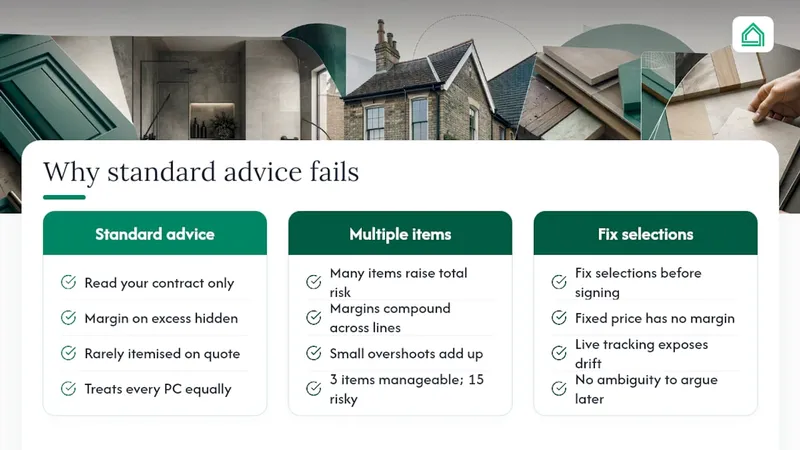
Conventional advice also treats every PC item as equally risky, when in reality the number of items matters more than any single allowance. A contract with three PC items carries manageable uncertainty. One with fifteen is a different proposition entirely, because small overshoots compound across every line.
My honest view: fixing selections before signing beats negotiating allowance levels every time, because a fixed price has no margin to apply and no ambiguity to argue over later. Tools that make allowances visible against real market prices, rather than a static number in a PDF, are what actually close this gap. Static schedules hide drift; live tracking exposes it while there's still time to act.
— Azai
Sources
- Prime cost and provisional sums | HIA
- Prime Cost Amounts - Association of South African Quantity Surveyors (ASAQS)
- Prime cost items: building contracts (Builtly)
FAQ
What is included in prime cost allowances?
A prime cost allowance covers the supply-only cost of a specific product, such as a tap or light fitting. It excludes installation labour, builder overheads, and profit margin, which are priced separately.
What are some examples of prime cost items?
Common examples include kitchen appliances, sanitaryware, tiles, tapware, light fittings, and door hardware. All of these are typically chosen after the contract is signed.
What is the main difference between a prime cost item and a provisional sum?
A prime cost item is a supply-only allowance for a defined product not yet selected, while a provisional sum covers work whose full scope isn't known yet, often including both labour and materials. Reconciliation for PC items compares an allowance against a supplier invoice; provisional sums compare an estimate against the actual cost of completed work.
How do I calculate the prime cost adjustment?
Subtract your original allowance from the actual invoice for the chosen product. If it's lower, you're typically owed a credit.
How much contingency should I budget for prime cost items?
Fixing high-value selections before you sign reduces how much contingency you actually need.