The most reliable way to track a renovation budget is to build a documented baseline, log every quote against it as a committed cost, run a change-order log for anything that shifts scope, and hold a graded contingency you review on a set cadence. This borrows straight from the basis of estimate discipline that professional estimators use, adapted for a homeowner checking numbers fortnightly or monthly rather than running a construction site.
TL;DR:
- Building a detailed baseline budget with clear categories and initial contingencies helps prevent overspending and clarifies each cost's scope.
- Always convert quotes into committed costs and track paid invoices separately to monitor actual expenditure against estimates and commitments.
- Maintaining a change-order log for scope modifications ensures transparency and helps distinguish approved increases from untracked overruns.
- Using simple tools like spreadsheets works for small projects, but dedicated platforms like House A-Z save time by consolidating estimate, invoice, and change tracking.
- First-time renovators should limit scope changes after the fourth week and verify all invoices against original quotes to avoid hidden costs and scope creep.
Table of Contents
- Split your budget and set a documented baseline
- Create a basis of estimate and get quote-backed line items
- Track actuals, committed costs and maintain a change-order log
- Contingency, forecasting and simple cost-versus-time checks
- Tools, templates and workflows for tracking every euro
- House A-Z: one example of this workflow in practice
- Practical priorities and the mistakes that catch first-time renovators out
- How House A-Z can help you implement this system
- Sources
- FAQ
Split your budget and set a documented baseline
Before a single trade is booked, your budget needs structure. Most renovation overspends trace back to one root cause: nobody wrote down what the number was actually for.
Start with a simple set of categories that mirror how money actually leaves your account:
- Design and professional fees
- Trades labour
- Materials and fixtures
- Permits and inspections
- Temporary services, including scaffolding and site utilities
- Waste removal and disposal
- Contingency
- Owner costs, such as furniture, storage or temporary accommodation
This is sometimes called a code of accounts, and the idea is simple: every euro gets one home, never two. Recommended practice on owner's costs points out that unclear boundaries between categories are where double-counting and omissions creep in, particularly at the seams between what an owner pays for directly and what a contractor's quote is assumed to include.
Once categories are set, give each line an initial contingency based on how confident you are in the number. Grading contingency this way, rather than applying one flat percentage across the whole project, is the same logic behind contingency guidelines used on far larger capital projects, just scaled down to kitchen and loft-conversion size.
Create a basis of estimate and get quote-backed line items
A number without context is just a guess wearing a suit. A basis of estimate, or BOE, is the short-written record behind each budget line: what's included, what's assumed, what's excluded, the date the price was valid, and the risks that could move it. AACE International's guidance on BOEs treats this document as the thing that makes an estimate defensible, not the total itself.
The practical workflow runs in four steps:
- Write a rough baseline estimate for each category, with your assumptions noted.
- Collect itemised quotes from at least two or three contractors per major trade.
- Convert accepted quotes into committed line items, replacing your estimate with the real figure.
- Track paid costs as invoices land, so estimate, committed and paid never blur into one number.
Two contractor totals rarely mean the same thing, and it's worth asking what each quote actually includes before assuming the cheaper one is the better deal. Six questions tend to surface the gaps fast: What's excluded from this price? Which allowances are placeholders rather than final figures? Who pulls the permit? Who handles waste removal? What happens if hidden damage is found once walls open up? And is this price valid past a certain date?
Pro Tip: Ask for the exclusions list before the price. A quote without exclusions almost always turns into a change order later.
Track actuals, committed costs and maintain a change-order log
Three numbers, side by side, tell you almost everything: what you estimated, what you've committed to pay, and what you've actually paid. Most home spreadsheets only track one of these, usually the estimate, which is exactly why so many renovations feel under control right up until they aren't.
Keep all three columns visible for every line:
- Estimate: your original or updated baseline figure
- Committed: the accepted quote or signed contract value
- Paid: cash that has actually left your account
Then run a separate change-order log for anything that alters scope after the baseline was set. AACE's guidance on change management treats this log as a core control, not paperwork, because it's the only clean way to tell an approved scope increase apart from a genuine overrun. A short entry might read: request date, reason for the change (say, upgraded tiles), affected category, quoted price, approved price, who's funding it, current status, and any effect on the finish date. House A-Z's own change-order guidance walks through the same fields in more depth for anyone setting one up for the first time.
Pro Tip: If a change wasn't logged, treat it as an overrun until proven otherwise. Verbal agreements have a habit of growing more expensive in retrospect.
Contingency, forecasting and simple cost-versus-time checks
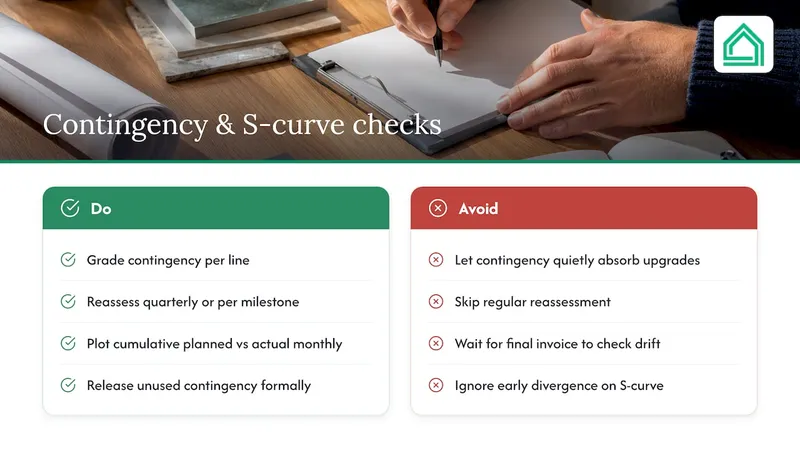
Contingency only works as a safety net if you can see exactly how much of it is left and why. Guidance on cost contingency recommends grading it per line, then reassessing it periodically, quarterly on longer projects or at each major milestone on a shorter renovation, and formally releasing whatever goes unused rather than letting it quietly absorb upgrades that nobody approved.
One example of professional cost-control practices you can borrow at home: AACE's recommended practice on S-curves describes plotting cumulative planned spend against actual spend over time to reveal divergence early, long before the final invoice makes it obvious.
You don't need project software to copy this. A simple monthly plot of cumulative planned cost against cumulative actual cost, built in any spreadsheet or a renovation timeline tool, shows whether you're tracking to plan or drifting, weeks before the drift becomes a crisis.
Tools, templates and workflows for tracking every euro
A tracker only earns its keep if it has the right fields. At minimum, each line needs: item name, owner (you, designer or contractor), a short BOE note, estimate, committed, paid, variance, a reference to any related change order, and a link to the receipt or photo.
- Spreadsheets work well early on and cost nothing, but they rarely handle contractor invites, shared visibility or automatic variance calculations gracefully.
- Field apps built for professional crews often assume a project manager is running them, which can feel like overkill for a single kitchen renovation.
- Homeowner platforms trade some of that flexibility for shareability, a built-in audit trail and features designed around a non-professional's workflow.
Whichever route you take, look for a few specific capabilities before committing: exportable reports you can hand to a lender or a partner, the ability to invite contractors directly, photo-based receipt capture, and simple invoice matching against the committed figure. Missing any of these usually means falling back on manual reconciliation, which is precisely the chore most homeowners are trying to escape.
House A-Z: one example of this workflow in practice
Some platforms consolidate the steps above into one interface rather than a spreadsheet plus three separate apps. These may use AI-driven insights tied to your budget, preferences and timeline to flag decisions before they become costly, alongside tools for direct contractor collaboration.
A typical sequence looks like this:
- Set your baseline and BOE notes for each category inside the platform.
- Invite trades to submit itemised quotes against those categories.
- Approve quotes, which converts them from estimate to committed cost automatically.
- Track committed versus paid as invoices come in.
- Log changes through the built-in change-order workflow rather than a side conversation.
Whatever platform you evaluate, including this one, check that it actually exports reports, supports contractor invites, and keeps a visible audit trail of every change. Those three things matter more than any interface polish.
Practical priorities and the mistakes that catch first-time renovators out
Document every decision the moment it's made, even the small ones about tile colour or socket placement. Limit changes requested after week four unless something structural forces your hand, and hold a proper budget review every fortnight rather than only glancing at the total when you're worried.
The mistakes I see repeated most often: contingency gets spent quietly on upgrades instead of genuine risk, scope was never written down clearly enough to hold anyone to it, and invoices get paid without ever being checked against the original quote. Fix those three habits and most budget disasters simply don't happen.
— Azai
Sources
- 34R-05: Basis of Estimate (AACE International)
- AACE terminology / guidance (change orders)
- Estimating cost contingency guidelines (NY guidance)
FAQ
Is there an app for tracking renovation costs?
Yes, several options exist, ranging from general spreadsheet templates to dedicated renovation platforms such as House A-Z that combine budget tracking with contractor collaboration and design tools. The right choice depends on how many trades and change orders you expect to manage.
Is 30,000 enough to renovate a house?
It depends entirely on the scope, location and condition of the property, since renovation costs vary widely by region and by what's being done. Rather than relying on a single figure, build a documented baseline with itemised quotes for your specific project before assuming any budget is sufficient.
Is £50,000 enough to renovate a house in the UK?
Whether a given budget covers a UK renovation depends on the size of the property, the trades involved and regional pricing, so there is no single answer that applies everywhere. Getting itemised quotes against a clear scope, as outlined in the basis of estimate approach, is the only reliable way to test a budget against reality.
What is the best app to track home improvement projects?
The best fit depends on whether you need simple cost tracking or a full workflow covering contractor collaboration, change orders and design decisions. Platforms like House A-Z are built specifically for homeowners managing all of these together, while a spreadsheet may suit a smaller, single-trade project.