A construction client portal is a secure online space where the person paying for the work can see what is happening on site, what has been spent, which documents are signed and which decisions are waiting on them, without ringing the builder to ask. A good one replaces a dozen phone calls and a tangle of email threads with one place that is always current. A bad one is a pretty login screen with stale information behind it.
This guide is for two readers: homeowners and first-time builders who want to know what a portal should give them, and anyone running a project who is deciding whether to use a contractor's portal, build their own or work from a shared planning workspace instead. We cover the features that matter, the failures that sink portals, what it costs, and a practical checklist you can use before you sign anything.
TL;DR
- A useful portal answers four questions at any hour: where is the project, what has been spent, what documents govern the work, and what is waiting for my decision.
- Most portals fail through neglect, not technology: nobody owns the content, so dates and statuses go stale and clients start calling again.
- Clients should see approvals, comments, progress and their own payments, not the builder's margins or subcontractor pricing.
- Custom portal builds are expensive; try what your existing tools offer first.
- If you are a first-time builder or renovator rather than a contractor, a planning workspace that you control, such as House A-Z, can give you the same clarity from the owner's side.
Table of Contents
- What a construction client portal actually does
- The four things every portal should show
- Where portals go wrong
- Portal, shared workspace or spreadsheet?
- What does a portal cost?
- Questions to ask before you sign
- Site logistics belong in the picture too
- Our perspective: the owner needs a portal too
- Using House A-Z alongside a contractor's portal
- Getting started: a simple setup for your project
- FAQ
- Sources
What a construction client portal actually does
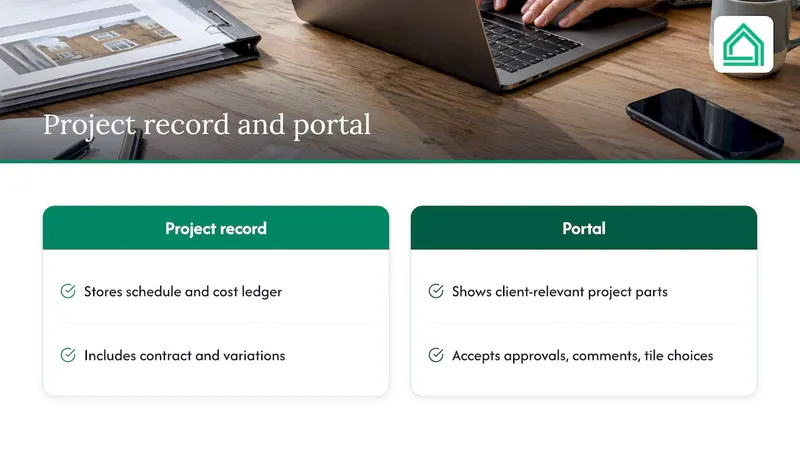
Think of a portal as a window, not a filing cabinet. Behind the window sits the real project record: the schedule, the cost ledger, the contract and its variations. The portal lets the client look through at the parts that concern them, and write back only what is theirs to give: an approval, a comment, a choice of tile.
That distinction matters. One industry write-up on portal design makes the point that effective portals read from a single system of record and write back only client-specific inputs, rather than keeping their own copy of the numbers. The moment a portal shows a figure that contradicts the invoice or pay application, trust drops, and it is very hard to win back.
For a homeowner, the practical benefit is calm. You stop wondering whether the plasterer turned up, whether the kitchen order has been placed, or why the last invoice was higher than you expected. For a builder, the benefit is fewer interruptions. As one portal specialist puts it, if a client is still calling, the portal is probably not doing its job.
The four things every portal should show
Published guidance on building these systems keeps landing on the same core. A guide from a no-code platform lists 24/7 visibility into status and milestones, daily logs, financial summaries and secure document storage as the essentials. Here is what each looks like when it works.
1. Progress and what comes next
The client should see the current stage, the next milestone and a date. "First fix electrics complete, plastering starts Monday 3 November" is useful. "In progress" is not. The same specialist quoted above argues that dated "what comes next" updates are what actually reduce anxiety, because they manage expectations before they turn into worried phone calls.
Photos help enormously. A dated photo of the opened-up wall beats a paragraph of explanation, and it creates a record you may be glad of later.
2. Money in plain view
Financial transparency means invoices, payment status, the contract sum, approved variations and what remains. For a homeowner, this is where the portal earns its keep. You should be able to see what you have been billed against which stage, and whether a variation has been added to the total.
If your contract ties payments to stages, the portal should mirror that schedule. The Federation of Master Builders notes that a well-drafted contract sets out the scope of works, a payment schedule tied to milestones and a timeline. A portal that does not reflect those three things is not reflecting your contract.
If you are planning a first build, our guide to setting up a construction draw schedule walks through how staged payments work and what to agree before the first one is due.
3. Documents in one secure place
Contracts, drawings, specifications, certificates, warranties, change orders. The point of a document vault is that everyone works from the current version. The risk of the alternative is familiar to anyone who has lived through a renovation: the electrician is working from drawing B while you approved drawing C.
If document control is your particular worry, see our piece on construction document control for how professionals keep versions straight.
4. Decisions and approvals
This is the part many basic portals miss. Projects stall when a decision sits unanswered: which bathroom suite, whether to accept a price for extra work, whether the revised layout is acceptable. A good portal lists open decisions with a due date, and records your answer with a timestamp.
The approval trail matters most for variations. A verbal "yes, go ahead" on site is the origin of many disputes. Our guide to managing change orders explains how to price, approve and record changes before the work happens.
Where portals go wrong
The technology is rarely the problem. Three failures account for most disappointments.
Nobody owns the content
A portal needs a named person responsible for every piece of information on it. The analysis from Build Flows is blunt: projects fail when a builder launches a portal but lacks the discipline to keep daily logs, milestone dates and change order statuses current. Without someone responsible for the narrative, the portal becomes an outdated repository that increases enquiries instead of cutting them.
As a client, ask one question before you commit: who updates this, and how often? If the answer is vague, expect stale pages by week three.
Stale data without a warning
A practical fix is to show when each view was last refreshed. Industry guidance recommends a "last-refreshed" date on every view so clients are not reacting to old numbers. It is a small detail that tells you a lot about whether the people behind the portal take accuracy seriously.
Showing too much, or the wrong things
Clients should see what they own: approvals, comments, their own invoices, progress. They should not see the builder's internal margins or what each subcontractor charges. The principle is called least privilege, and exposing the wrong figures can lead to costly and unnecessary financial disputes. If you are the homeowner, do not be offended that you cannot see the builder's costings. Be reassured that the system is built with boundaries.
Weak security
Homeowners share plans of their house, financial information and sometimes security details. The same source advises against public publishing links and against storing client passwords internally, and favours identity services or expiring magic links, with every approval, login and document view logged with a timestamp and user ID. You do not need to understand the architecture. You do need to ask whether links expire, whether access is limited to your project, and whether activity is logged.
Portal, shared workspace or spreadsheet?
The right tool depends on who you are. The table compares the main routes by type, not by brand.
| Route | Best for | Strength | Watch out for |
|---|---|---|---|
| Contractor's own portal | Homeowners hiring a builder who already uses one | Live updates straight from the people doing the work | You see only what the builder chooses to publish; you cannot take it with you |
| Custom-built portal | Larger firms with unusual reporting needs | Exactly your format and integrations | Cost, and the need for someone to keep it current |
| Production-builder ERP | Volume builders, roughly 50 to 250 homes a year | One database enforcing margin control | Heavy for one-off projects |
| Spreadsheets, email and messaging apps | Very small jobs | Free and familiar | Versions drift, nothing is recorded, nobody has the full picture |
| Owner-side planning workspace | First-time builders, renovators, couples | You hold the budget, plan and records yourself | Needs the contractor to engage, at least with shared exports |
The split between volume and custom builders is real. Analysis of builder software finds that production builders tend to favour single-database ERP systems that automate purchase orders from design selections, while general-purpose management tools suit custom, low-volume residential work where homeowner communication is the priority. If you are building one house or renovating one kitchen, you are firmly in the second camp.
What does a portal cost?
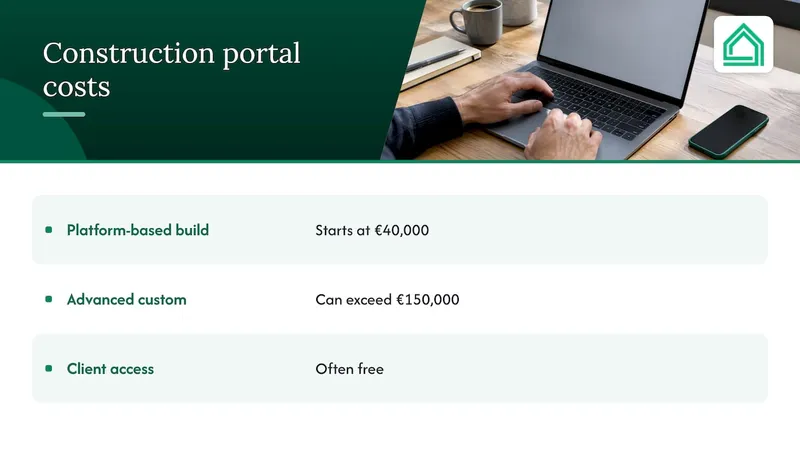
It depends enormously on whether you are buying or building. For a contractor commissioning a bespoke portal, ScienceSoft reports that standard platform-based builds typically start at €40,000, while advanced custom solutions can exceed €150,000. That is a firm-level investment, and one reason the advice from Build Flows is to try the portal your existing platform already includes before building anything of your own.
The same ScienceSoft page notes that residential software has been moving towards custom, project-volume pricing rather than published monthly rates. For a homeowner, that is rarely your cost to bear: contractors typically carry the subscription, and clients are often given free access. But it does mean you cannot assume a builder's portal will be portable or available after the job.
If you want your own tools instead, subscription planning software is far cheaper than any bespoke build. Our own plans are listed further down.
Questions to ask before you sign
Whether you are choosing a builder or a tool, this checklist separates real portals from decorative ones.
- Who updates it, and how often? Ask for a named person and a rhythm: daily logs, weekly summaries.
- Does it show the payment schedule from the contract? The stages, amounts and status should match what you signed.
- How are variations handled? Each change should have a price, a description and your recorded approval before work starts.
- Can I see dated photos? Particularly of anything that will be covered up: pipework, insulation, wiring.
- What do I see, and what don't I? Expect progress and your own money. Do not expect the builder's margins.
- How is access secured? Individual logins or expiring links, with activity logged.
- What happens to my records at the end? You will want the warranties, certificates and drawings after handover. Ask for an export.
- Has the builder been vetted? A portal does not make a contractor good. Run through our contractor onboarding checklist and verify three references first.
Site logistics belong in the picture too
A portal that tracks only trades and invoices misses the practical side of a build: skips, deliveries, waste, access. Debris is a good example. Someone has to arrange removal at the right stage, and the cost and timing affect your schedule. If you are weighing options, this overview of construction debris disposal routes for homeowners and professionals is a useful reference for what to ask before you book. Whatever you choose, put the dates in your shared plan so the builder and you are working from the same calendar.
Our perspective: the owner needs a portal too
Most conversations about client portals start from the contractor's side: how can a builder keep clients informed? That is a fair question, but it leaves out the person who is living through it. A first-time builder is not short of information from the site. They are short of a structure to make sense of it.
We built House A-Z for that person. Instead of juggling spreadsheets and separate apps, you get budget tracking, design suggestions and project management in one place, with AI agents that give personalised insight based on your budget, preferences and timeline. It works in plain language, because the people we serve are not professionals and should not need to be.
Here is what we have learned. The expensive mistakes in a build are rarely dramatic. They are a variation nobody priced, a selection made late, a payment released before a stage was complete, a decision that two partners made differently. A portal that lets the builder broadcast progress helps with some of that. A workspace that lets you hold your own budget, plan and decisions helps with all of it, and it travels with you from one contractor to the next.
That is why we build for collaboration too. You can bring your partner and your contractors into the same project, so the conversation happens against one set of numbers. Our guide on how first-time builders can partner with contractors in one afternoon shows how that works in practice. And if the whole thing feels heavier than you expected, you are not alone: we have written about why owner-builders face more stress than most expect.
Our advice is simple. Use the builder's portal if they offer one, and insist it follows the checklist above. Keep your own record alongside it, so the figures that matter to you never depend on someone else's login.
— Azai
Getting started: a simple setup for your project
You do not need to wait for a builder to hand you a login. Here is a sequence that works for most homeowners.
- Set the budget before the first quote. Know your ceiling and your contingency, so every quote is read against something.
- Put the contract terms in one place. Scope, payment schedule and timeline, as the FMB advises.
- Agree the reporting rhythm with your builder. Weekly dated update, photos at defined stages, a named contact.
- Log every decision with a date. Even if the builder's portal does this, your own record is your insurance.
- Reconcile at every payment. Check the invoice against the stage, the variations and your own budget before you pay.
- Keep the closing records. Certificates, warranties and drawings. Before you move in, use a final walkthrough guide so snagging is recorded rather than remembered.
One caution from the industry is worth repeating: software cannot fix a lack of organisational discipline, it only exposes it. The tool helps, but the habit of recording and checking is what protects you.
FAQ
What is a construction client portal?
It is a secure online space where a client can see project progress, photos, costs, documents and pending decisions, and respond to approvals. It reads from the builder's main project records rather than being a separate copy. Its job is to reduce the need for phone calls and chasing.
Do I need a client portal for a small renovation?
Not necessarily a formal one. For a small job, a shared plan with a dated schedule, a written scope and payment stages may be enough. What you do need is a single place where decisions and variations are recorded, whether that is a portal or a planning workspace you control.
Can a homeowner see everything the builder sees?
No, and you should not expect to. A well-designed portal shows you progress, your own invoices, documents and approvals, while keeping the builder's internal margins and subcontractor pricing out of view. That boundary prevents disputes rather than hiding anything that affects your contract.
How much does it cost to build a custom portal?
For a contracting firm, ScienceSoft reports standard builds from around €40,000 and advanced ones above €150,000. Most firms are better served trying the portal in their existing software first. Homeowners rarely pay for the builder's portal directly.
Is House A-Z a client portal?
It is an owner-side planning workspace: budget tracking, design suggestions, project management and collaboration with partners and contractors in one place. It complements whatever the builder uses on site, and gives you your own record of the project.
Sources
- ScienceSoft: Construction client portals, capabilities, integrations, costs
- Knack: How to build a construction client portal
- HomebuildingCFO: Finding your digital foundation
- Build Flows: Construction client portal, when to build a custom one
- Opsite: Why your clients keep calling you
- Federation of Master Builders: Builder's contracts, avoiding common pitfalls