
Float is the amount of time an activity can slip without pushing the finish date, calculated directly from the critical path method network. Total float measures flexibility against the whole project; free float measures it against the very next task in line. Get that distinction wrong, and you risk a scheduler celebrating "spare time" that a neighbouring trade has already quietly spent.
TL;DR:
- Total float indicates how much an activity can slip without delaying the overall project finish date, but it doesn't account for the immediate successor’s flexibility.
- Free float measures how much an activity can delay without impacting the start of its very next task, making it critical for on-site trades coordination.
- Confusing total float and free float can lead to scheduling disputes, as one may appear ample while the other is fully consumed by nearby activities.
- Ownership of float varies by contract and often belongs either to the project, the contractor, or the employer, requiring clear documentation and evidence to resolve disputes.
- Monitoring float consumption rates and setting escalation thresholds helps detect imminent delays, reducing risks of schedule slippage and costly rework.
Table of Contents
- Construction float explained: the CPM foundation
- The four types of float you need to know
- How to calculate float step by step
- Who owns the float: contract positions and disputes
- Monitoring float: consumption rates and escalation thresholds
- Common float mistakes that cost you time and money
- A five-step checklist to get float under control this week
- How House A-Z helps you keep float under control
- Why float discipline matters on site
- Sources
- FAQ
Construction float explained: the CPM foundation
Float exists because the critical path method (CPM) calculates four dates for every activity: early start (ES), early finish (EF), late start (LS), and late finish (LF). Wherever those early and late dates don't align, you get float. Zero float means the activity sits on the critical path; any delay there delays the whole project.
On a Gantt chart, float shows up as the grey trailing bar behind an activity. On a network diagram, it's the mathematical gap between two passes through the logic. Treating that gap as "padding" is the single most damaging habit in scheduling, because float isn't slack someone added for comfort; it's calculated flexibility that belongs to the logic of the network itself.
That distinction has real cost consequences. PMI's guidance on float analysis explains that schedules reporting only total float, and never free float, leave trades unknowingly consuming each other's flexibility. One crew finishes late "within float," and the next crew inherits a squeeze nobody flagged.
- Zero float = critical path activity
- Positive float = flexibility that can absorb delay
- Negative float = the schedule already can't hit the finish date without intervention
The four types of float you need to know
Most scheduling arguments trace back to confusing these terms. Each float type answers a different question, and using the wrong one is how disputes start.
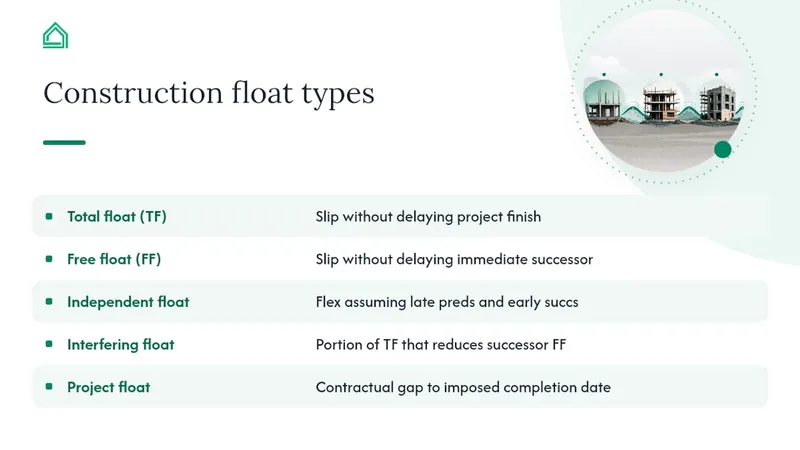
Total float (TF) measures how much an activity can slip without delaying the project finish date. Formula: TF = LS − ES (or equivalently, LF − EF). It's the headline metric contract administrators watch, because it tracks against the overall completion date.
Free float (FF) measures how much an activity can slip without delaying its immediate successor. Formula: FF = ES(successor) − EF(current activity) − lag. When an activity has multiple successors, use the earliest successor ES in the calculation, as Rework's float and slack explainer sets out. FF is the metric that actually matters on site, because it governs handoffs between trades this week, not the finish date six months out.
Independent float is the flexibility available assuming predecessors finish as late as possible and successors start as early as possible. It's a conservative, rarely used figure that matters mainly in claims analysis. Interfering float is the portion of total float that, if consumed, eats into a successor's free float. Project float is different again: it's the contractual gap between the calculated finish date and an imposed contract completion date, not a CPM output at all.
A peer-reviewed review in the Open Construction and Building Technology Journal makes the point plainly: schedulers who manage only total float miss the interfering and free float problems building up beneath it. One float type rarely tells the whole story.
How to calculate float step by step
Calculating float means running two passes through the network, then subtracting.
- Build the network. List every activity, its duration, and its logical predecessors and successors, including any lag.
- Run the forward pass. Starting from day 0, calculate early start (ES) and early finish (EF) for every activity, working forward through the logic. EF = ES + duration.
- Run the backward pass. Starting from the project finish, calculate late finish (LF) and late start (LS) for every activity, working backward. LS = LF − duration.
- Calculate float. Total float = LS − ES (or LF − EF). Free float = ES of the earliest successor − EF of the current activity − any lag.
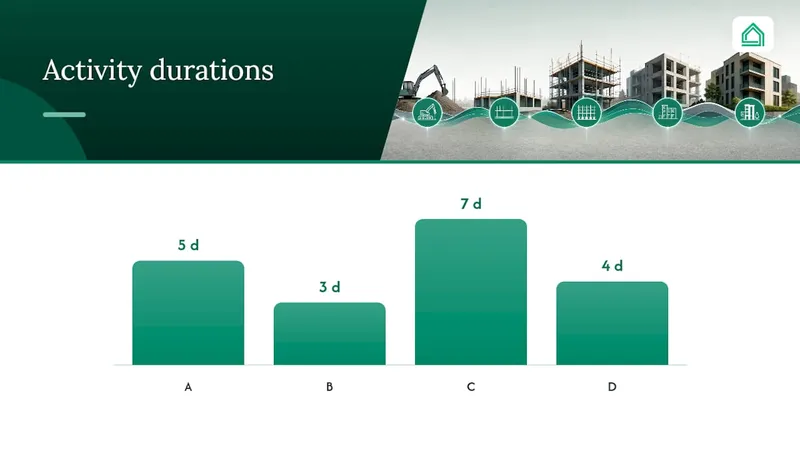
Here's a compact example. Activity A (5 days) leads to Activity B (3 days) and Activity C (7 days), both of which feed Activity D (4 days). A starts day 0: ES 0, EF 5. B and C both start after A: B has ES 5, EF 8; C has ES 5, EF 12. D can't start until both finish, so D's ES is 12, EF 16.
Working backward from a project finish of day 16: D's LS is 12. C, feeding D directly with no slack, has LF 12, LS 5, giving TF = 0 (critical). B has LF 12 (it must be ready before D's LS of 12), LS 9, giving TF = 4 days. But B's free float is only ES(D) − EF(B) = 12 − 8 = 4 days too, since B has one successor. A sits on the critical path with TF and FF both at zero. Any negative result at this stage tells you the current logic can't hit the stated finish date without corrective action.
Who owns the float: contract positions and disputes
Ownership of float is not a CPM output. It's a contractual position, and the three common stances differ sharply.
- Shared or project float: nobody owns it outright; it belongs to the project and whichever party needs it first gets to use it, subject to good faith.
- Contractor ownership: the contractor's programme, contractor's float. Employer-directed changes that eat into float may still trigger compensation.
- Employer ownership: the employer can direct changes that consume float without paying for delay, provided the finish date holds.
Standard forms handle this differently, and wording varies release to release. The FIDIC suite of contracts and equivalents like NEC and JCT each carry their own conventions on programme ownership and float, so check the actual clause in front of you rather than assuming a default position from a different project.
When ownership is contested, contemporaneous evidence wins arguments that opinions don't. Keep dated schedule snapshots at every update, run float consumption reports showing who used what and when, and log change events against the schedule the day they happen, not weeks later when memories have drifted. Recording modifications properly, as covered in guidance on managing construction change orders, makes float disputes far easier to resolve.
Monitoring float: consumption rates and escalation thresholds
Watching a single float number each month tells you where you stand. Watching the rate of float consumption tells you where you're heading, and that's the more useful signal.
Float consumption rate is simply the days of float lost per schedule update. An activity that drops from 20 days TF to 15 over one update is consuming float five times faster than one dropping from 20 to 19. Practitioner guidance on float analysis in construction schedules recommends building a routine around this: baseline snapshot at contract award, a "top consumers" list at every update, and a near-critical watchlist for anything trending toward zero.
Set thresholds before you need them. Examples include escalating any activity with low total float against a contractual milestone, or flagging any activity losing significant float in a single update.
Pro Tip: Run your near-critical watchlist alongside resource levelling reports. Activities losing float fast are often the same ones about to get squeezed by a resourcing clash nobody has spotted yet.
- Track float trend, not just float value
- Set numeric thresholds for escalation before the problem arrives
- Cross-reference near-critical activities against resource levelling
Common float mistakes that cost you time and money
- Confusing TF and FF. A trade celebrating 10 days of total float might have zero free float, meaning the very next crew has no buffer at all.
- Float sequestering. Constraints, artificial date-locks, or missing logic links can hide float or make it look larger than it is. ScheduleLens's explainer on total float versus free float warns that an unusually large float value on an isolated activity usually means a missing successor link, not genuine flexibility.
- Ignoring trend, not just value. A single snapshot showing positive float says nothing about how fast it's disappearing.
- Letting negative float sit unaddressed. Negative float after an update means the current logic cannot hit the contract finish date without a corrective plan.
A five-step checklist to get float under control this week
- Snapshot your baseline CPM schedule and archive it before the next update.
- Run a float consumption report and publish the top five consumers to the wider team.
- Assign free-float monitoring at trade level, with clear rules for who checks handoffs before starting.
- Record every change event against the schedule the same day it happens, not retrospectively.
- Escalate anything below your agreed threshold immediately, rather than waiting for the monthly update.
Templates for capturing these snapshots and milestones are covered in House A-Z's guide to choosing a finish schedule template.
Why float discipline matters on site
Projects that track float consumption properly see fewer disputes over who caused what delay, because the evidence exists before the argument starts. Fewer arguments mean less rework and cleaner claims. Explore House A-Z's templates for building that discipline into your own schedule from day one.
— Azai
Sources
- Save time and money on projects by using float (PMI)
- Reviewing construction schedule float management (Open Construction and Building Technology Journal)
- Float and slack: total float vs free float explained (Rework)
- Float analysis in construction schedules: what it tells you and when to worry (Change Inspector blog)
FAQ
What are the three types of float?
The three most commonly cited types are total float, free float, and independent float, though schedulers also use interfering float and project float for more specific analysis. Total float measures slack against the project finish; free float measures slack against the next activity.
Who owns the float in a construction programme?
Ownership depends on the contract wording: float can be shared, owned by the contractor, or owned by the employer, and standard forms like FIDIC, NEC, and JCT each phrase this differently. Always check your specific clause rather than assuming a default position.
What is total float versus free float?
Total float (TF = LS − ES) measures how much an activity can slip without delaying the whole project finish date. Free float (FF = ES of the successor − EF of the current activity − lag) measures how much it can slip without delaying its very next successor, and free float can never exceed total float.
How do I calculate project float?
Project float is the contractual gap between your CPM-calculated finish date and an imposed contract completion date, so it's found by subtracting one from the other rather than through the ES/EF/LS/LF formulas used for total and free float. Total and free float, by contrast, come directly from running a forward and backward pass through your network.